Once the MoversSuite Email Service is enabled, MoversSuite users can utilize the MoversSuite Email Service in all email functions within the application. You can find a list of the email functions within the MoversSuite Email Service Email Settings topic. If the service is not enabled, then the default mail service specified is either Microsoft Outlook or one defined within the SMTP Setup.
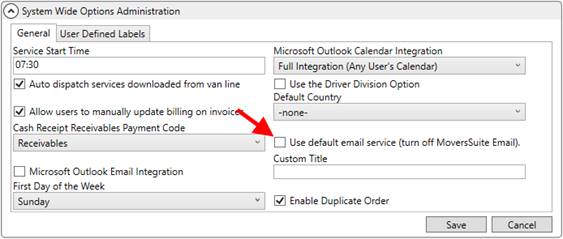
To enable the MoversSuite Email Service, uncheck the Use default email service (turn off MoversSuite Email) option within the System Wide Options. Unchecking this flag instructs the application to offer the MoversSuite Email Service as a default message service when creating new mail messages through MoversSuite.
Figure 15: System Wide Options
Additionally, check the Microsoft Outlook Email Integration flag within the System Wide Options if the underlying mail service on your system is Outlook. MoversSuite Email Service references this service for inbound mail and capturing mail messages sent from the MoversSuite Email Service. If the underlying mail service is not Outlook, then use the SMTP Setup to reference the correct mail message service.