MoversSuite Administration > Accounting and Financial Services > Electronic Merchant
Link your system to a merchant service provider using this setup. Contact your merchant service provider to setup an account and obtain the data and credentials specified for this setup. Once this data is setup users can access Electronic Payments functionality.
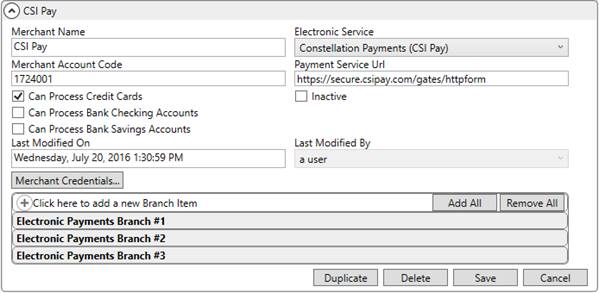
Figure 31: Electronic Merchant Setup
The following table describes the fields and functions within this setup.
|
Field/Function |
Description |
|
Merchant Name |
Provide a name of the merchant account with which is processing your Electronic Payments (up to 50 characters). This name appears atop of the Secure Payment Form. |
|
Electronic Service |
Select the appropriate service processor for your Electronic Payments. MoversSuite currently supports the following provider: Constellation Payments (CSI Pay)
|
|
Merchant Account Code |
Enter the account number provided by the Electronic Service provider specified above (up to 20 characters). |
|
Payment Service Url |
Enter the URL provided by the Electronic Service provider specified above to send electronic payment requests through (up to 255 characters), example: http://secure.csipay.com/gates/httpform MoversSuite processes electronic payments through this URL. Included in the information sent in the request are the Merchant Account Code and the login data set through Merchant Credentials. |
|
|
Identify which Payment Type is available through the Capture New Payment Method and the Credit Card/Bank Payment screens by ticking the option. For example, if you want only the Credit Card option available, place a checkmark next to Can Process Credit Cards and leave the two bank option unchecked. |
|
|
Check the Inactive flag to disable this provider record. |
|
Last Modified On |
The name of the MoversSuite user that last modified this record displays along with the date and time of the change. |
|
Last Modified By | |
|
|
Merchant Credentials Open Electronic Merchant Credentials dialog to set the login credentials for the Electronic Service provider. This information is required to process requests through the Payment Service Url. |
|
Branch Items |
Add branches that you wish to support Electronic Payments for the Electronic Service provider specified. The branches specified must also support Cash Receipts. See Electronic Payments Setup and Administration for details. |
|
|
Duplicate Create an exact copy of this provider record. |
|
|
Delete If the record is not in use, you can press Delete to remove this provider record from the system. |
|
|
Save Keep changes made to the record, including those entered through the Merchant Credentials function. |
|
|
Cancel Revert changes to the record back to the last saved state. |







