) within Add Revenue Item they will access the Customer
screen where they can choose a different customer and/or billing address for the
item.
) within Add Revenue Item they will access the Customer
screen where they can choose a different customer and/or billing address for the
item.
The user can assign any revenue line on an order to a particular customer. Doing so will cause a separate invoice(s) to be produced on the order for the items being billed to alternate customers. Transactions generated for the item will also post to the alternate customer.
When the user clicks on the Customer ellipse button
() within Add Revenue Item they will access the Customer
screen where they can choose a different customer and/or billing address for the
item.
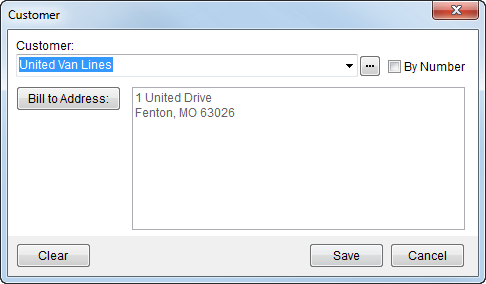
Figure 33: Customer screen
The following table describes the fields and functions available within this screen.
|
Field/Function |
Description |
|
Customer |
Select an alternate customer to bill for the revenue
item using the drop-down menu list or through the Customer Find ( |
|
|
Bill to Address Select an address for the billing from the list of those defined for the customer. See Choose Billing Address for more information. |
|
|
Clear Selecting Clear will remove the selections made for Customer and Bill To Address. |
|
|
Save This function saves changes made within the screen. |
|
|
Cancel Pressing Cancel will discard all changes made and close the dialog. |
 ) By Number will change the drop-down
menu to display the customer number instead of the customer name (by
default).
) By Number will change the drop-down
menu to display the customer number instead of the customer name (by
default).