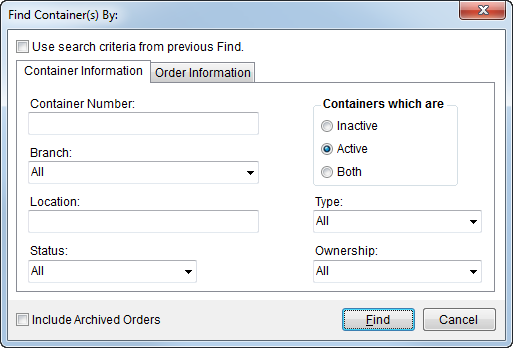
Use the Container Information tab to locate records based on specific container information, including Container Number, Location, and whether the container is active or not. This search tab is available through the Advanced Search button located on the Container Management screen and it is used to populate the data grid within Container Management.
This Find tab is available through Container Management.
Figure 15: Container Information tab
The following table describes the fields available through the Container Information tab. Refer to Find the topic for information on the functions available through this dialog.
|
Note |
|
The search values for this tab are generally set for a container within Container Setup and/or Container Management. |
|
Option |
Description |
|
Container Number |
Search for container records based on part or all of an entered value. The application compares what is entered here to the Container Number defined within Container Setup. |
|
Branch |
Include one or more selected branches in the search for containers. The branches selected here are compared to the branch assigned to the container through Container Setup. Of note, only containers that you have branch access to are included in the search results. |
|
Location |
Enter part of or all of an address associated to a container. The address searched by the application includes street address, city, state, postal code, and country. |
|
Status |
Select one or more status values to filter search results by. The application compares the values selected here to the status set for the container. |
|
Containers with are |
Choices here include the ability to include containers that are marked active and/or inactive in the search results. Only containers marked “Active” are available for order assignment. |
|
Type |
Filter search results to include selected Container Type by setting this parameter. |
|
Ownership |
Select one or more ownership types to filter search results by. The application compares the values selected here to the ownership type set for the container. |
RELATED TOPICS: