 ) next to the Booking Number field
from with Shipping
Information will open this screen.
) next to the Booking Number field
from with Shipping
Information will open this screen.
Use the Booking Number screen to add contact
references for an air shipment. The Booking number screen will be
available when the selected Transport Mode has a type of
Sea. Pressing the notebook button ( ) next to the Booking Number field
from with Shipping
Information will open this screen.
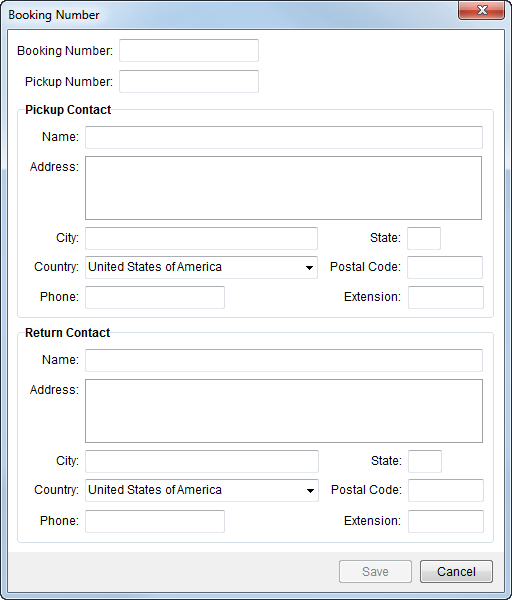
Figure 8: Booking Number screen
Described in the table below are the fields and functions available to the Booking Information screen.
|
Field/Function |
Description |
|
Booking Number |
Enter the booking number provided by the carrier for the shipment (up to 64 characters). The value entered here will also display in Shipping Information next to the Booking Number label. |
|
Pickup Number |
Enter the reference number provided by the pickup service (up to 64 characters). |
|
Pickup Contact |
|
|
Name |
Enter name of the contact person responsible at the pickup location (up to 128 characters). |
|
Address |
Enter up to three lines (256 characters each) for the pickup contact location. |
|
City |
Enter the city of the pickup contact (up to 26 characters). |
|
State |
Enter the state of the pickup contact location (2 characters). |
|
Country |
Select the country of the contact location from the available list. |
|
Postal Code |
Enter the zip code of the pickup contact location (up to 10 characters). |
|
Phone Number |
Enter the phone number for the pickup contact (see Phone Number Entry). |
|
Extension |
Enter the phone number extension for the pickup contact (up to 10 characters). |
|
Return Contact |
|
|
Name |
Enter name of the contact person responsible at the return location (up to 128 characters). |
|
Address |
Enter up to three lines (256 characters each) for the return contact location. |
|
City |
Enter the city of the return contact (up to 26 characters). |
|
State |
Enter the state of the return contact location (2 characters). |
|
Country |
Select the country of the contact location from the available list. |
|
Postal Code |
Enter the zip code of the return contact location (up to 10 characters). |
|
Phone Number |
Enter the phone number for the return contact (see Phone Number Entry). |
|
Extension |
Enter the phone number extension for the return contact (up to 10 characters). |
|
|
Save (Alt+S) Press this button to save the booking contact to the order and close the screen. |
|
|
Cancel Discards any changes made to the booking contact and closes the screen. |

