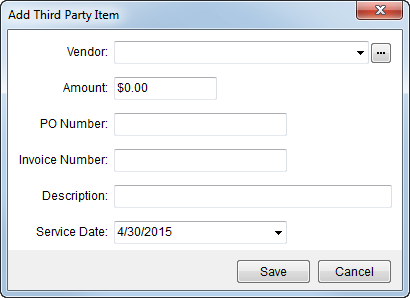
Use the Add Third Party Item dialog to add and edit a billing item from a third party vendor. Access this dialog through the Add and Edit buttons from the Third Party Services screen and through the Third Party Services tab in Revenue Entry.
Figure 43: Add Third Party Item dialog
Described in the table below are the fields available within the Add Third Party Item dialog.
|
Field |
Description |
|
Vendor |
Select the third party vendor providing the
service. Use the Vendor
Find ( |
|
Amount |
Enter the dollar amount of the service. |
|
PO Number |
Purchase order number supplied by the vendor for the service (up to 20 characters). |
|
Invoice Number |
Invoice number supplied by the vendor for the service rendered (up to 20 characters). |
|
Description |
Enter a detailed description of the services provided by the vendor (up to 60 characters). |
|
Service Date |
Provide the date of the service, which defaults to the current system date. |
|
|
Save Pressing Save will keep the changes made and will close the screen. |
|
|
Cancel Pressing Cancel will close the screen without saving changes. |
 ) screen to locate
appropriate vendor.
) screen to locate
appropriate vendor. 
