Order Information > Move Location > New Section > Guarantee Price Info card
If section has been added: Order Information > Move Location > Guarantee Price Information section
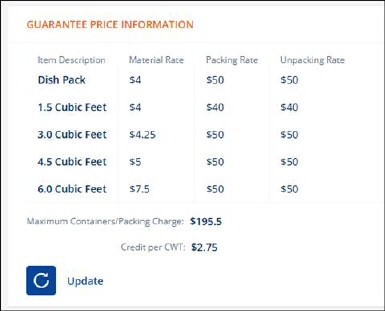
MSWeb offers Guarantee Price Information functionality.
Figure 55: Guarantee Price Information
To use:
1. Choose Bottom Line Guarantee Price within Shipment Type. Set this option when entering a lead or order within the Move Information tab or within Move Information > Order Details (Figure 56).
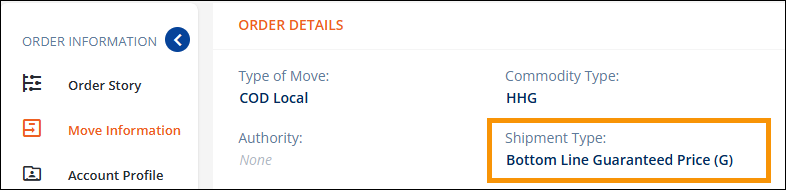
Figure 56: Shipment Type is set to Bottom Line Guarantee Price.
2. When the guaranteed price option has been selected, the Guarantee Price Info card will appear within the MSWeb New Section.
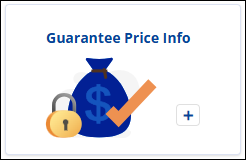
Figure 57: New Section > Guarantee Pricing Information card
3. Clicking this card will open the Guaranteed Price Information screen (Figure 58). Click Save. When saved, the Guaranteed Price Information section will list within Move Information (Figure 55).
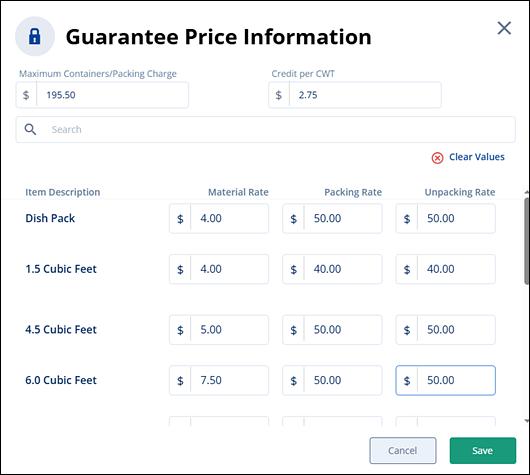
Figure 58: Set prices within the Guarantee Price Information screen.
To add or edit information:
1. From Move Information > Guarantee Price information section, click the update button.

2. Update fields as needed.
3. Click Save.