MSWeb Navigation Menu >
Communications > Messages > select conversation under Conversations
tab
MSWeb Header > Messages
(Global Level) > select Order Number and contact
Set a Signature which will be at the end of every message you
send. Signatures can be added or edited anytime the Signature icon  is available. The Signature window
lets you add a new signature or edit the existing one. In Figure 237, the Signature
was created and shows as “Mollie Mallory.” “Mollie Mallory” is at the bottom of
every message sent and shows in the area where messages are entered. Click the
area above the Signature to type your message.
is available. The Signature window
lets you add a new signature or edit the existing one. In Figure 237, the Signature
was created and shows as “Mollie Mallory.” “Mollie Mallory” is at the bottom of
every message sent and shows in the area where messages are entered. Click the
area above the Signature to type your message.
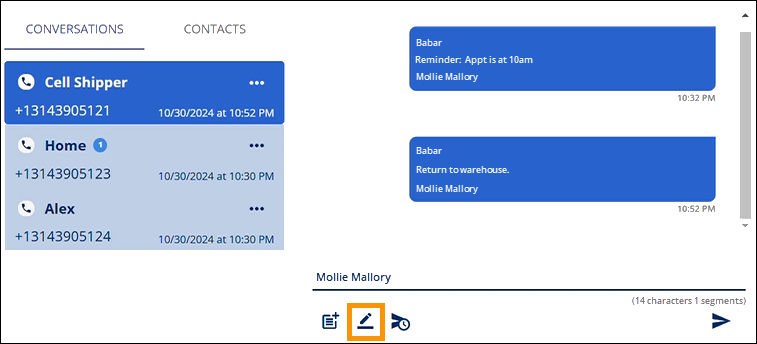
Figure
237: A Signature has been already been created and is "Mollie Mallory."
If a Signature has not been created, hovering over the
Signature icon prompts the “Add Signature” message. If a Signature is already
created, hovering over the icon will prompt the “Edit Signature” message.