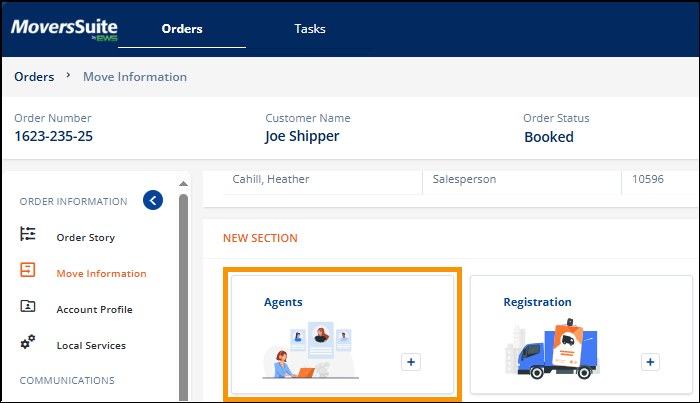
Move Information > New Section > Agents tile
To add an agent to a transaction, go to Move Information. If an agent has not already been added, go to the New Section and click the MSWeb Agents tile. If one has already been added, it will list within its own section within Move Information and the Agents tile will not be shown within New Section.
Figure 40: Move Information > New Section > Agents tile. The tile may not be in this exact location on your transaction.
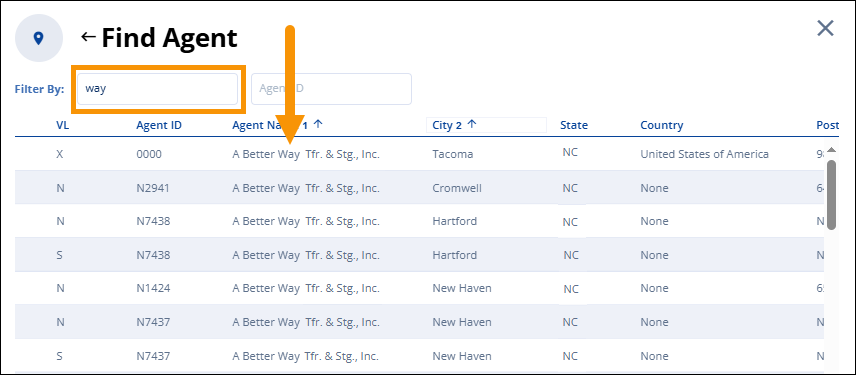
Within Find Agent, search using the Agent Name and/or the Agent ID. Enter any information - or partial information - to filter only the Agents that meet that criteria. The ability to sort by columns is available. Click on a header once or multiple click to change the sort direction. Multiple sorts are possible, as shown below with the 1 and the 2. If using more than one sort, click a header, hold the Shift key, and then click another header. Click on the Agent to select it and it will populate the Agent card. Click Save.