
Action buttons > Option button > Issue Claim Alert option
Issue a Claim Alert within MSWeb by clicking the Option button (outlined in orange) and choose “Issue Claim Alert.” This opens the Claim Alert screen.
 |
Details on completing the Claim Alert screen are the same as Add Note, except the Note Type is set to Claim Notification. The default Note Status is Private. This setting determines whether the note is visible outside of MoversSuite or not. Private means that it won’t be sent along with order data to other external systems outside of MoversSuite. Set to Public to allow the note to be shared with external systems.
If a Claim Alert has already been issued on the order, this banner will show on the Claim Alert screen.
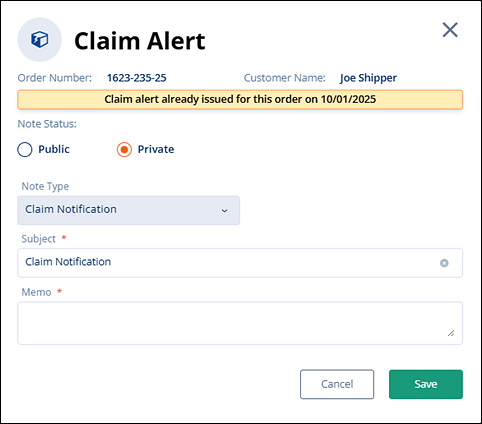
Figure 163: Claim Alert screen
Adding another Memo to the Claim Alert screen with this warning will simply add an appended note to the existing Claim Notification.
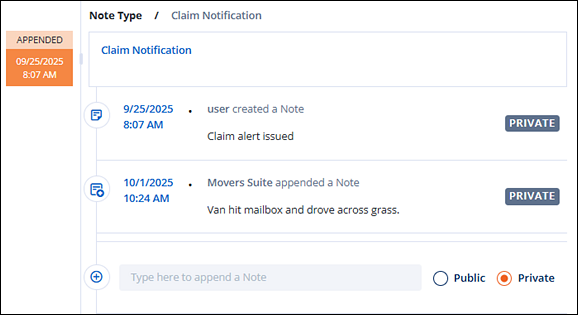
Figure 164: Claim Notification with appended note added and listed
Anytime a Claim Alert is completed and saved, the Claim Alert sends out an email notification and logs a note on the MSWeb Order Timeline. The email notification goes out each time the Claim Notification is appended, as well, such as in Figure 165 which is the notice emailed after the appended note was added in Figure 164.
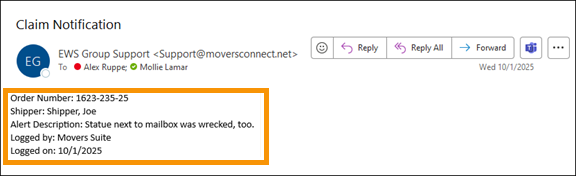
Figure 165: Sample of email notification
Issue Claim Alert is available throughout the application, such as shown below within the MSWeb Order Story.

Figure 166: Order Story (as noted beside Orders below the blue header) and Options menu is indicated.
RELATED TOPICS:
Claim Alert
MSWeb Order Details
Order Story