MoversSuite Administration > Military > Carrier
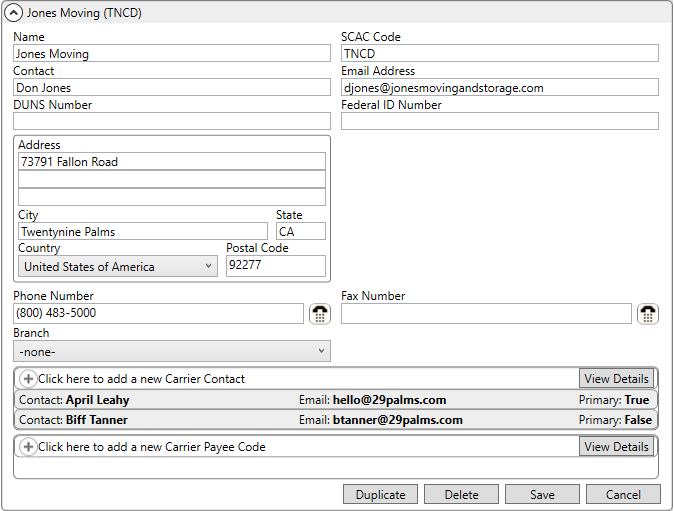
The Carrier Setup (Military/Government) defines military carrier records referenced by a MoversSuite move requests and by data exchange processes for Atlas, EasyDPS, SIRVA, and UniGroup. Carrier records are assigned to an order through the Carrier base setting within the Military/Government tab and are visible within the Carrier Information (Military/Government) screen.
Figure 10: Carrier Setup
Technical Field Information
Reference the following table when managing military carrier records.
|
Field |
Description |
|
Name |
Enter the values that will be available within the Carrier field in Military/Government (up to 64 characters).
NOTE: Carrier assignment on a military order appears on Forms 619, 619-1, and 1840.
|
|
SCAC Code |
Enter the Standard Carrier Alpha Code (SCAC) that uniquely identifies the carrier within the transportation industry (up to 4 characters). |
|
Contact |
Enter the main contact person for the carrier (up to 32 characters). |
|
Email Address |
Enter the email for the contact person. Separate multiple email addresses using a comma or a semicolon. Field accepts up to 128 characters. |
|
DUNS Number |
Enter the Dun and Bradstreet (DUNS) number assigned to this carrier record by the military (up to 16 characters). Generally, the DUNS number represents a contractor or grantee of the US Federal Government. |
|
Federal ID Number |
Enter the government-supplied identification number used to report financial transactions (up to 16 characters). |
|
Address |
Enter the physical address of the carrier: Address lines (3 lines of 256 characters); City (26 characters); State (2 characters); select a Country (Country Code Setup), Postal Code (10 characters). |
|
Phone Number |
Enter the phone number and extension of the contact person. |
|
Fax Number |
Enter the fax number of the contact person. |
|
Branch |
Link this carrier record to a Branch Setup record. The EasyDPS Integration utilizes this setting to determine which branch to set for an order when downloading military orders (based on the SCAC Code). |
|
Carrier Contact |
|
|
Associate contacts for the carrier within this section. Contact records appear for carriers within the Military/Government tab. You can also add and edit the contact records through the Carrier Information (Military/Government) screen. Refer to Add Base Contact for specifics. Use the View Details buttons in this section for additional viewing and editing options. | |
|
Carrier Payee Code |
|
|
Define payee code values needed to identify the banking information associated to electronic fund transfers (EFT) for this carrier. Use the View Details buttons in this section for additional viewing and editing options. | |
|
Description |
Enter a text description to identify the payment information (up to 64 characters). |
|
Payee Code |
Enter the data referenced by an external system to identify the payment source for this carrier, such as a bank account number (up to 32 characters). |
|
Is Default |
Check this flag to identify one of the Payee Code records to be used as a default in cases where the application cannot find a match on Payee Code records for this carrier. |
RELATED TOPICS:
Atlas Integration Setup and Administration
Carrier Information (Military/Government)
Form 619 and Form 619-1 Contents
Military Forms to MoversSuite Data Cross Reference