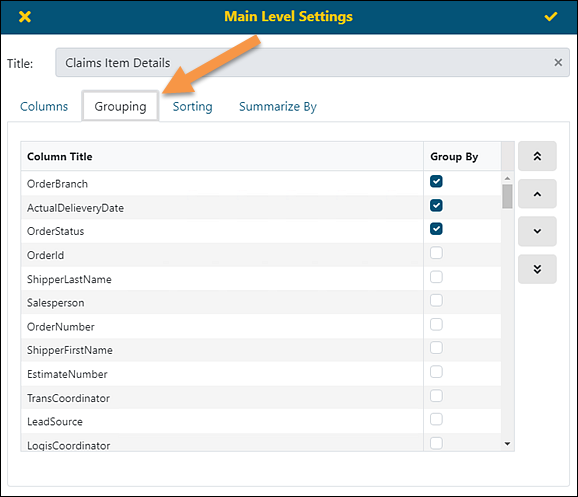
Properties > Main Level Settings > Grouping tab
Properties > Details Setting > Grouping tab
Grouping gives the ability to put rows of similar information together in the report. You may also set of the default order of the grouping. To move data up and down on the list, click to highlight then use the arrow keys on the right to move it up or down the list.
The functionality is available through several screens: Main Level Settings, Second Level Settings, Third Level Settings (See BI Tool Main Level Settings) and Details Settings (see BI Tool Details Settings.)
Figure 149: Grouping tab
When the “Group By” field is applied, Column Titles of those set as “Group By” will show at the top of the report and in the order listed within the Group By tab. In Figure 150, notice the settings from Figure 149 are shown.
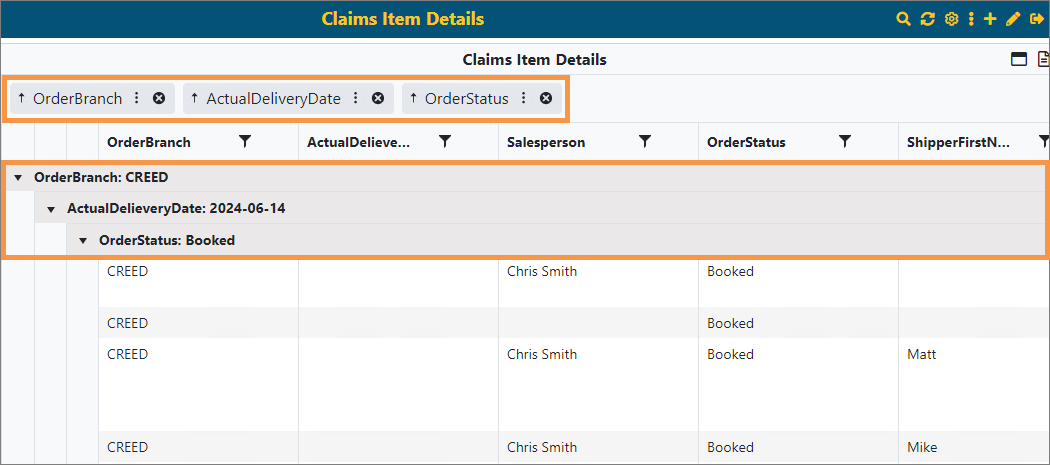
Figure 150: Grouping used in shown with the red arrow at the top