MoversSuite Administration > Accounting and Financial Services > Rate Plan
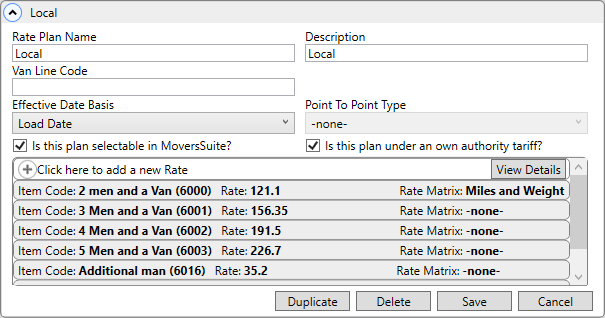
Rate Plans consist of individual rates for each Item Code you want available to an order, invoice, quote, revenue item, or storage billing. Rates are created from Rate Plans as shown in Figure 40. Use the “Click here to add a new Rate” option and then see Add Rate for further details.
Figure 40: Rate Plan Setup
A Rate Plan is assigned through the following locations:
|
Location |
Setting |
|
Set the Tariff/Rate to a plan in effect for order revenue or revenue imported into the application. | |
|
The Rate Table controls which rates are available to the Billing Items for the storage billing record. |
For viewing options and options to help manage these records, use the Mass Record Selection Options dropdown located at the top right corner of the screen.
Update multiple Rate Plans at once using Mass Update Rate Plan(s). Keep in mind that whatever option is chosen will apply to all the records on the screen; therefore, when used, be sure to use Search or Advanced Search to narrow the list to only the Personnel Setup records needed for the Mass Record Selection Options chosen.
Rates added to a Rate Plan Setup record will list at the bottom of the record under “Click here to add a new Rates.” Click on a line item to open and view the task. The View Details button is also able to view, edit, and has the added use of Mass Record Selection Options to sort the tasks. See View Details for more information.
Technical Field Information
The following table describes the fields and functions available within this setup.
|
Description | |
|
Rate Plan Name |
Enter the name for the rate that will appear as an option available in all Rate and Tariff/Rate fields, such as the Tariff/Rate field in Billing Information (up to 12 characters).
Rate Plan Name and Description are synonymous; however, the application references the Rate Plan Name when applied to an order, e.g. Billing Information, and Description when applied to a specific charge, such as storage billing.
A user can generally assume that the Tariff/Rate applies to the entire order record, whereas the Rate Table drives a specific piece of functionality within the order itself. A good example of this is in the Recurring Billing Setup and Administration, where a user can specify a Rate Table that overrides the Tariff/Rate table that may have been set at the order level.
If a downloaded Rate Plan does not exist in MoversSuite, then it is added automatically. In such cases, only known values are set and both the selectable and own authority flags are unchecked. |
|
Description |
Enter text that will display as options available within the Rate Table fields, such as in Billing Record within Recurring Billing (up to 30 characters). This value is also assigned to a Rate Plan Setup record |
|
Van Line Code |
Assign codes used by external application to identify a particular rate for exchanging revenue data (up to 16 characters).
SIRVA Note: Enter the national account contract code required by SIRVA in this field. |
|
You can set which order date is referenced when utilizing effective dates assigned to rates included in this plan. By default, the basis is set to the Load Date of an order. Refer to Effective Date Basis for further detail. | |
|
Point to Point Type |
If you wish to enable Point to Point Rating for this plan, then set this value from the following options:
Air/Ocean Ports Country Postal Code State
This option is only available on new Rate Plan records or if there are no detail Rate items assigned to a plan.
Once set, you can only define Rate items for the corresponding type. For example, if the type is set to Airport, then you can only specify rate eligibility based on Origin Airport and Destination Airport settings within Add Rate. |
|
|
Is this plan selectable in MoversSuite? Check this flag to instruct the application to display
this rate as one of the options available through the Tariff/Rate
field in MoversSuite. Leave this option unchecked to not have the
rate available. |
|
|
Is this plan under an own authority tariff? Set this flag to indicate that this plan represents an own authority tariff. Leave this flag unchecked if van line tariff applies. This setting relates to using contracts to discount rates on a local tariff. |
|
Rate |
|
|
Use Click here to add a new Rate” to define individual rate items available through this plan.
The details are specific to an Item Code and include the ability to set a default rate, overtime rate, and double time rates, etc. Refer to Add Rate for details on field settings available. Use the View Details buttons in this section for additional viewing and editing options.
Note: Discounts applied to Item Code rates are set within Contract Master Setup for details. | |
RELATED TOPICS:

