The Capacity Planning feature compares information set in several setup areas to what is requested or what is assigned. The information from the setup areas is considered the total amount available or capacity. The data set within MoversSuite itself reduces the capacity to compute the available amount. Refer to the Capacity Planning Setup topic for information on setting the capacity values. The remainder of this section discusses the MoversSuite data that affects Capacity Planning.
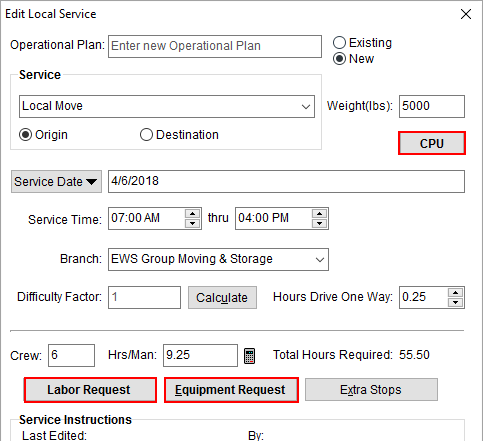
Capacity Planning utilizes data set for a Local Services request through the Add Local Service screen. Packing counts entered through the CPU option, along with Labor Request and Equipment Request amounts to determine the demand. For planning types based on hours, the application references the Service Time, and possibly the Hrs/Man setting as well.
Figure 6: Add Local Service screen
The data referenced by is detailed in the following table.
|
Setting |
Description |
|
CPU |
The estimated Packing counts within Update Containers, Packing and Unpacking are compared to the various packing types. The application compares these counts to what is available for the branch as set within the Daily Packing Capacity Setup. Types available to Capacity Planning are those with the Packing Capacity Bucket set within Material Type Setup. |
|
Service Date |
The date of the service is what Capacity Planning searches by and reports on. |
|
Service Time |
Prior to actual assignments in Local Dispatch, hourly personnel and equipment requests are allocated based on the service date spread (refer to the Service Time Evaluation section below for more information). |
|
Hrs/Man |
If only the first Service Time date is set, then the application references the Hrs/Man computed (less drive time) based on order values and what is requested for labor and equipment needs. |
|
Labor Request |
Counts set within the Labor Request dialog and associated to supported labor types are included in Capacity Planning. Types available to Capacity Planning are those with the Capacity Bucket set within Labor Type Setup. This represents the estimated labor needed for a given day. |
|
Equipment Request |
Counts set within the Equipment Request dialog and associated to supported equipment types are included in Capacity Planning. Types available to Capacity Planning are those with the Capacity Bucket set within Equipment Type Setup. This represents the estimated labor needed for a given day. |
Local Dispatch Assignment
Once assignments are made through Local Dispatch, the application no longer references equipment and labor requests. Instead, Capacity Planning is based on the actual assignments made to determine the need. The application references the following for actual assignments associated to Capacity Planning:
Update Containers, Packing and Unpacking
Default Branch
When equipment and personnel assignments are made, the application references those resources and crew that have a Default Branch set on the Equipment Setup or Personnel Setup record that matches that which was selected through Capacity Planning.
The application also considers all branches within the Dispatching Common View when displaying information on the selected branch within the Capacity Planning page.
If a resource or person is assigned to a service that is not its Default Branch (or within its Dispatching Common View), then the application reduces capacity for their Default Branch. For example, if the Default Branch of a driver is AAA and they are assigned to a service on branch BBB, then the capacity for branch AAA is reduced by the number of hours (or the count) assigned to BBB.
Service Time Evaluation
Capacity Planning evaluates times for equipment and personnel differently depending on where the service is at in the process. If assignments have been made through Local Dispatch, then the job start and end times are considered. Otherwise, the application references the requested times entered for the service within Add Local Service.
If only the requested start time is set, then the hours per man (Hrs/Man) is referenced, assuming that the service is completed on the same day.
If the time range crosses the midnight boundary, then times are split into separate days.
Rounding
Capacity Planning is designed as an estimating tool, therefore data is rounded. When computing the need in hours, the application rounds up to the next hour. So, if the total service time requested for a given day is 41 hours and 53 minutes, the application rounds this to 41. Likewise, if the total is 41 hours and 13 minutes, the application still rounds up to 41. This rounding is most evident within the hours available that display for the Capacity columns within Capacity Planning.
When calculating the capacity, the application does the opposite: it rounds down to the next hour. So, if the total available amount of labor on a give day is 35 hours and 30 minutes, the application rounds this down to 35 hours.
Similarly, percentages that display for the Capacity Used are also rounded up to the next highest whole number.
The idea behind rounding in this manner is to never over calculate availability, i.e. err on the side of caution.