line icons.
The
main menus for Enterprise BI
are
located to the left and right corners of the screen and can be accessed by
hovering over the horizontal line icons.

The middle of the top pane will display the name of the report currently in use, and a few options below it in white.

NOTE: The Refresh, Date Range Filter, PDF and Excel options will only work for Reports, and cannot be used when a dashboard is displayed.
If the view is on a Rebuild Cache schedule, the date and time of the last rebuild will be shown next to the report name.

On the right side of the menu line, the name of the user currently logged in will be displayed (‘john’ in the example shown.)
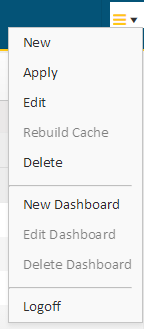
Clicking
on the horizontal lines icon will display a drop-down
list with various options to create, edit or delete reports or dashboards. You
can also apply changes on the fly or rebuild the report cache.
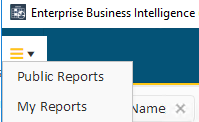
Click
on the top-left corner to display the menu for the
Reports Menu Editor where users can create, re-name, and remove folders
from the Public / My Reports menus. Users can also customize the display
order of folders and reports.
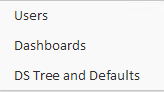
NOTE: To edit the Public Reports folder, a user must have Administrator access set in their profile.
Administrators will also see an Administration menu with various Enterprise BI setup sub-menus as shown below:
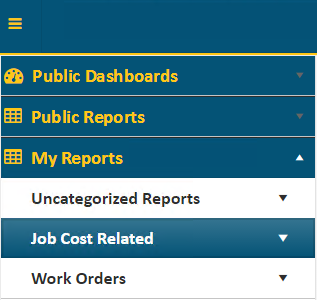
Hovering
over the pushpin icon  in the left-hand corner or
anywhere within the left blue vertical bar will display a three-section menu
with Public Dashboards, Public Reports, and My Reports
options. Clicking the pushpin icon
in the left-hand corner or
anywhere within the left blue vertical bar will display a three-section menu
with Public Dashboards, Public Reports, and My Reports
options. Clicking the pushpin icon  will lock the menu in
place.
will lock the menu in
place.
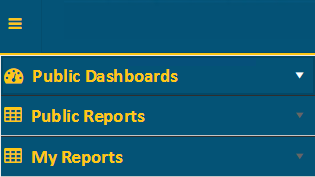
Public Dashboards and Public Reports are accessible by all users, while My Reports are ones that are that are private and available to only the current user.
NOTE: Access to various reports and dashboards will depend on your security settings.
Clicking
the arrow  to the right of each menu option will
display the reports/dashboards to choose from, as well as sub-folders that will
drill down into other related reports. Dashboards are listed individually and
are not contained in sub-folders.
to the right of each menu option will
display the reports/dashboards to choose from, as well as sub-folders that will
drill down into other related reports. Dashboards are listed individually and
are not contained in sub-folders.