
The options shown in the middle of the screen will work only on Reports.
Clicking Refresh will refresh the data for the current report in use.
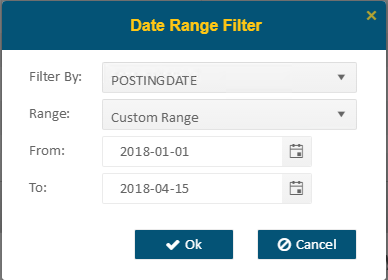
Use the Date Range Filter button to filter report information by a certain field, Range (which you can select from the drop-down menu such as Current Week, Month or Year-To-Date), or a Custom Range which can be set using the From: and To: fields. Press Ok to apply the filter and re-display the report with the filter applied.
Press
the PDF  button to generate the report in
PDF format.
button to generate the report in
PDF format.
NOTE: Reports larger than 1000 rows cannot be exported to PDF. You can either reduce the dataset by using filters or export the full dataset to Excel.
Press
the Excel  button
to generate the report in Excel format.
button
to generate the report in Excel format.