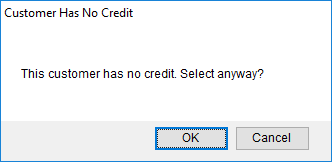
MoversSuite provides a tool allowing your company to prevent customers from being assigned to an order in cases where they do not meet defined credit criteria. Users attempting to assign a customer to an order that has a poor credit standing with your organization can receive a warning, such as the one in the image below.
Figure 37: Customer Has No Credit warning dialog
Your company can define the behavior of the warning through the Credit Warning Lockdown Setup. This setup allows you to control customer assignment based on data received from Microsoft Dynamics GP. MoversSuite can be setup up control customer assignment based on the following credit verification conditions:
Current AR Balance Exceeds Customer’s Credit Limit
Current AR Balance Approaching Customer’s Credit Limit
Customer has No Credit Limit
Customer is On Hold
The verification occurs when a user attempts to change the Customer field available through the following locations:
Account Profile (any place where the profile is set and the profile links to a customer)
Order Information (Revenue Entry)
Users with appropriate security privileges can override the credit warning. When a user with appropriate access to the Credit Override module attempts to save the customer setting, then they are prompted to enter their MoversSuite user password. This provides is a security precaution in the event a user has left a MoversSuite session open and unattended.
The credit warning can also be setup to send an email notification to the collector assigned to the customer through AR Credit & Collections or to one or more email recipients defined within the Credit Warning Lockdown Setup. Setup options also provide an option to create an order note anytime a user receives a credit warning.
Refer to Customer Credit Verification Setup for a list of setup options.
RELATED TOPIC