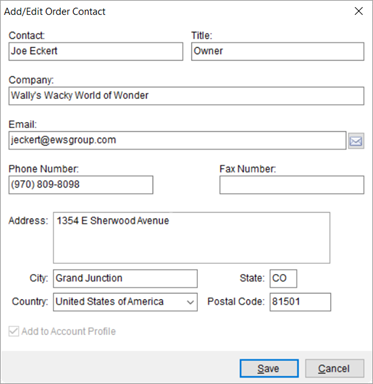
Use the Add/Edit Order Contact dialog to create a new contact or update an existing one associated to an order. This screen is available by pressing Add or Edit from within the Contacts section on the Contacts and Locations tab. It is also available through the Add Contact option within the Quote tab.
Figure 8: Add/Edit Order Contact
Set the Add to Account Profile flag to permanently add the contact to those available for the Account Profile assigned to the order.
Changes made to an existing contact are stored for the order you are on only. Changes do not affect the permanent Account Profile record. To update the contact information permanently, make the change through Account Profile Setup.
Technical Field and Function Information
|
Field |
Description |
|
Contact |
Provide a name for the contact person (up to 30 characters). The name entered here is available when importing a contact into the Contacts grid (through the Import from Account Profile menu) and through the Contact assignment within Add/Edit Order Location. |
|
Title |
Enter the title or role of the contact person within the company (up to 50 characters). |
|
Company |
Enter the company name (up to 100 characters). |
|
|
Provide the email address for the contact person (up to 120 characters). You can email this contact person through several functions within MoversSuite, include through a right-click option within the Contacts grid on the Contacts and Locations tab. |
|
Phone Number |
Provide a phone number for the contact person. Press the
|
|
Fax Number |
Provide a fax number for the contact person. Press the
|
|
Address |
Enter up to three address lines for the contact (up to 256 characters each). |
|
City |
Enter the name of the city for the contact (up to 26 characters). |
|
State |
Enter the two-digit state code for the contact. |
|
Country |
Select the name of the country associated to the contact
address. Of note, you can format a phone number through the phone control
by pressing the |
|
Postal Code |
Enter the postal code associated to the address (up to 10 characters). |
|
|
Add to Account Profile Check this option to permanently add the contact record to the Account Profile set on the order. Once added to a profile, the contact record is available to other orders. |
RELATED TOPICS:
 button to access the