
Two videos on this topic are located within Transactions Videos.Click the links below to view the videos that relate to this topic.
How to Complete an Processing Outbound Transaction from an Expected Transaction
|
|
Two videos on this topic are located within Transactions Videos.Click the links below to view the videos that relate to this topic.
How to Complete an Processing Outbound Transaction from an Expected Transaction |
This topic refers to the column titled “Processing” within Outbound Transactions.
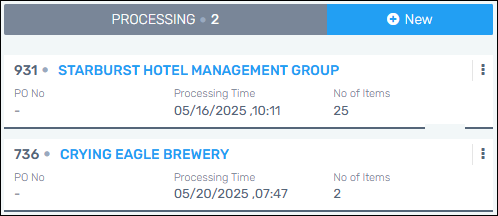
Figure 5: Outbound Processing column
Any Special Instructions added to an Outbound Transaction will list on the Outbound Notification Emails.
Click the three dots ( ) on any transaction card for the following
options:
) on any transaction card for the following
options:
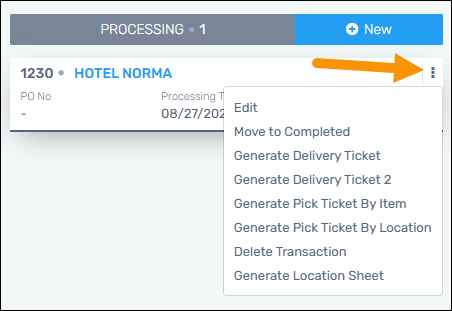
The difference between Delivery Ticket and Deliver Ticket 2 is that Delivery Ticket 2 is organized by Inventory Numbers. If there is an item that does not have an Inventory Number in the transaction, it will be at the bottom of the list.
RELATED INFORMATION: