Navigation Menu > Billing & Payments > Generate Invoices
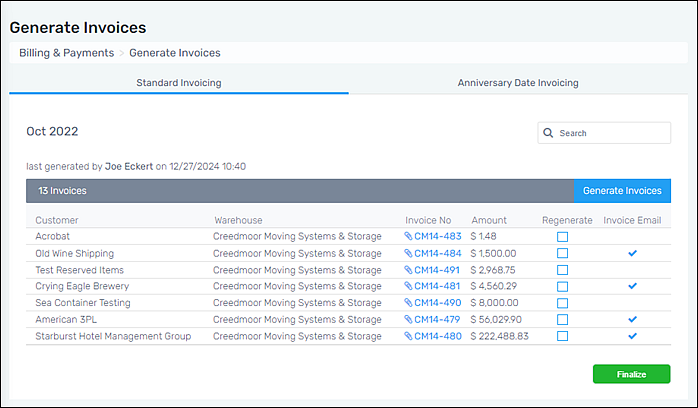
“Generate Invoices” displays a list of all open invoices for the current open month. Generate Invoices organizes invoices within two tabs: Standard Invoicing and Anniversary Date Invoicing. The tab on the screen is denoted by the blue underline under the tab name. In the image below, Standard Invoicing is on the screen. For Customers who have the “Send invoice by email” option set within their Customer record > Contact Info Tab, a copy of the invoice is emailed when the invoice is Finalized.
Figure 1: Generate Invoices
The instructions below are valid for either tab.
To view a draft of the invoice:
Click on the blue paperclip and invoice number located under the “Invoice No” column. A new tab will open with a rendering of the invoice.
To regenerate all invoices:
Clicking the blue “Generate Invoices” will regenerate all the invoices.
To regenerate specific invoices:
To regenerate specific invoices, check the “Regenerate” checkbox for the specific invoice(s) that need to be regenerated. Then, click the blue “Generate Invoices” button to regenerate just those invoices.
To finalize and close the month (when available):
See Finalize Billing for details.
RELATED INFORMATION