MoversSuite Administration > Web Interface > Web Planner
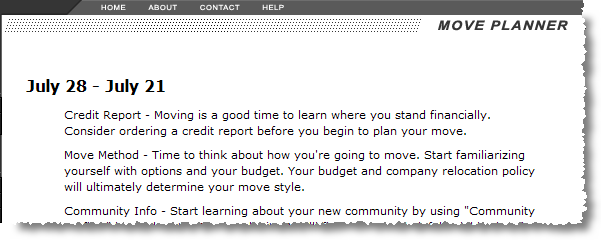
Web Planner setup defines the messages that display for an order on the Personalized Move Planner based on the number of days before, during, or after a move.
This information can consist of anything a company feels would benefit a transferee and is based on live data taken from the order accessed by the transferee through the Customer Web Portal.
Figure 38: Move Planner screen
Messages created within the Web Planner setup will appear on the Move Planner page based on the entered date range compared to the Delivery Dates within Move Information for the selected move.
Use the following table to define records within this setup.
|
Field |
Description |
|
Start Days From Move |
Enter the beginning range value as the number of days from the delivery date of the move that the message will appear. Positive numbers indicate days prior to the move, a value of 0 corresponds to the actual Delivery Date of the move, and negative numbers indicate the number of days after delivery. |
|
End Days From Move |
Enter the ending range value as the number of days from the delivery date of the move that the message will appear. Positive numbers indicate days prior to the move, a value of 0 corresponds to the actual Delivery Date of the move, and negative numbers indicate the number of days after delivery.
Example: To provide weekly messages, for example, set the days as a multiples of seven from the delivery date of the move. For example, to display a message eight weeks prior to the move, enter 63 for the Start Days From Move and 56 for the End Days From Move.
|
|
Message |
Enter a free-form message that will display when the Personalized Move Planner option is evoked by a transferee using the Customer Web Portal (up to 256 characters). The message will appear for the date range selected for the next two settings. |