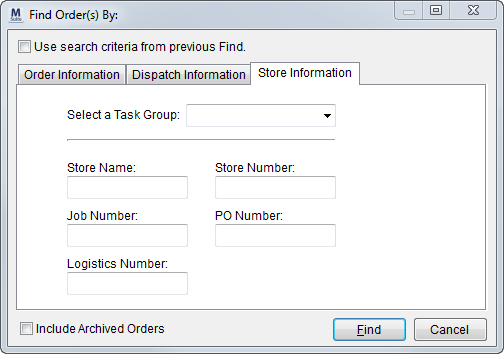
The Store Information tab uses data specific to Special Services to assist in locating orders. This Find tab is available through in the following areas:
Figure 15: Store Information tab
The following table describes the fields available through the Store Information tab. Refer to Find the topic for information on the functions available through this dialog.
|
Option |
Description |
|
Select a Task Group |
Include in the search orders with a Task Group matching the group selected here. The application compares what is set in this field to what is set for the order for the Task Group (within Name, Address, Phone). Refer to the Find Search Tips section for details on using this field to filter search results by a company. |
|
Store Name |
Include in the search orders with a store name matching what is set in this field. The application compares this value to what is set for Name for one more jobs defined in Store Information. Refer to Store Name in Add Job for more information. |
|
Store Number |
Include in the search orders with a store number matching what is set in this field. The application compares this value to what is set for Store No. for one more jobs defined in Store Information. Refer to Store Number in Add Job for more information. |
|
Job Number |
Include in the search orders with a job number matching what is set in this field. The application compares this value to what is set for Job No. for one more jobs defined in Store Information. Refer to Client Job No. in Add Job for more information. |
|
PO Number |
Include in the search orders with a purchase order number matching what is set in this field. The application compares this value to what is set for P.O. Number within Store Information. |
|
Logistics Number |
Include in the search orders with a purchase order number matching what is set in this field. The application compares this value to what is set for Logistics Order No. within Store Information. |
|
Invoice Number |
Include in the search orders with a purchase order number matching what is set in this field. The application compares this value to what is set for Invoice Number within Store Information. Note: This is not an invoice associated to revenue; it is generally regarded as an implementation number for the job. |
RELATED TOPICS: