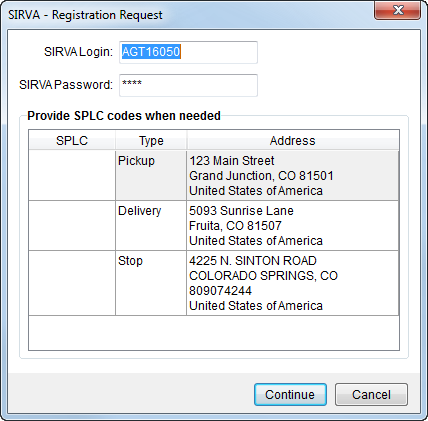
The SIRVA – Registration Request screen prompts users for login credentials for SIRVA sHub as well as SPLC values for each location associated to the MoversSuite lead that was open when a user performed a SIRVA Registration Upload.
Figure 2: SIRVA - Registration Request screen
SIRVA sHub requires SPLC codes to exact the location of the following types:
•Pickup (Origin Address)
•Delivery (Destination Address)
•All entered Extra Stops
The request will generate a file and transmit it to SIRVA. The user can monitor the request, along with other requests, using the Third Party Interface Order Monitor. The Third Party Interface Order Monitor will appear automatically when the upload requests is made and will remain open until the user chooses to close it. The application allows for multiple requests at the same time.
Errors from both SIRVA and MoversSuite display in the monitor.
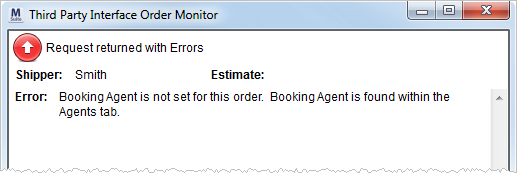
Figure 3: Third Party Interface Order Monitor
Messages from the SIRVA sHub will typically be in all uppercase lettering and may contain the ATS Program information. The ATS Program will help indicate where the upload process encountered an error as displayed in the table below.
Cross-reference the section that indicates an error to the data sent for the lead in the format listed within SIRVA Registration Upload Content.
|
ATS Program Name |
Error encountered will be related to the following: |
|
RGR01 |
GENERAL section, contains the Booker and Self Haul Agents |
|
RGR02 |
Origin location and OASV/EASV information |
|
RGR03 |
Destination location and DASV information |
|
RGR04 |
Shipment Weights and Miles information |
|
RGR30 |
Bulk items such as VEHICLE, etc. |
|
RGR32 |
Container/Pack/Unpack information |
|
RGR34 |
Crates information |
|
RGR35/CRA55 |
Services like LABR, etc. |
|
RGR36 |
Valuation information |
|
RGR38 |
Storage information |