Setup
Description
Map location types assigned to move locations in MoversSuite to EasyDPS support external codes. The following codes are support by EasyDPS and need to map to MoversSuite Location Type records.
|
External Code |
Description |
|
PRIPCK |
Primary pickup (Moving From) |
|
PRIDLV |
Primary delivery (Moving To) |
|
ATHPCK |
Additional pickup (Extra Stop Pickup) |
|
ATHDLV |
Additional delivery (Extra Stop Delivery) |
|
INTRS |
Intransit address |
Link carrier records to supported branches through the Branch field. The branch set for the Branch links to a military order through the SCAC Code, therefore to ensure that successful downloads occur, make sure that each SCAC Code supported by EasyDPS has an appropriate branch association.
Map the commodity code associated to a household goods move an External Code of “HHG” for the EasyDPS interface. The “HHG” is also known as the Shipment Type in EasyDPS.
Define the following note types to support integration with EasyDPS all with a Van Line Code linked to “EasyDPS”:
“EasyDPS”
Document order notes received from EasyDPS
“EasyDPS Destination SIT Notes”
Document stored at location of SIT at the destination location
“EasyDPS Origin SIT Notes”
Document stored at location of SIT at the origin location
The application adds or updates any phone type associated to a MoversSuite address included in a download from EasyDPS. No initial setup required.
Define an interface record with Vendor Name of “EasyDPS.” This interface is referenced by other setup areas, such as XML System Setup and Commodity Type Setup.
Create a system record with the following fields set:
|
Field |
Value |
|
Interface |
“EasyDPS” |
|
Internal System |
“EasyDPS” |
|
External System |
“EasyDPS” |
|
XML System Option |
Name set to “EasyDPS” and Value set to “1” |
|
XML System Data Type |
XML System Date Type set to “Order Information,” Name set to “EasyDPS” and leave Clear previous XML errors before processing unchecked |
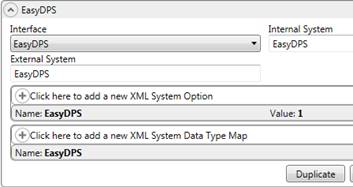
Figure 6: EasyDPS example in XML System Setup