Keyboard shortcut: Ctrl+H
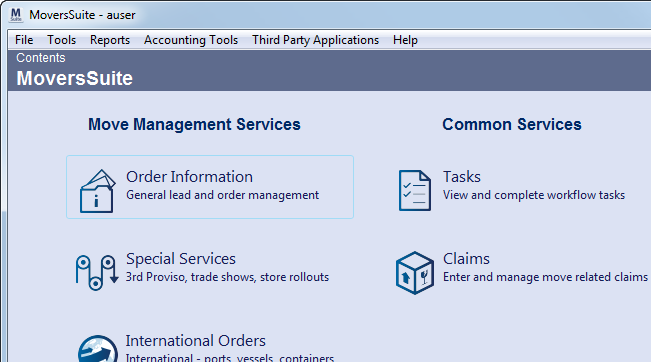
Figure 113: Contents screen
The Contents screen initially appears when the MoversSuite application starts up and a user has successfully logged in. Users can get back to this screen anytime using the keyboard shortcut of Ctrl+H.
The following table describes the functions available on this screen.
|
Icon |
Description |
|
Move Management Services | |
|
|
Order Information Opens the Order Information module to easily manage all active orders and leads. |
|
|
Special Services (Ctrl+G+S) Opens the Special Services module to coordinate special products, trade shows, and store rollouts. |
|
|
International Orders (Ctrl+G+I) Opens the International Orders module to control logistics and equipment for international jobs. |
|
|
Local Dispatch (Ctrl+G+L) Opens the Local Dispatch module to manage local work, crews, and equipment. |
|
|
Long Distance Dispatch (Ctrl+G+D) Opens the Long Distance Dispatch module to manage long distance trips, drivers, and logistics. |
|
Common Services | |
|
|
Tasks (Ctrl+G+T) Opens the Workflow tab in the Tasks module to easily view and complete workflow tasks. |
|
|
Claims (Ctrl+G+M) Opens the Claims module to enter and manage move-related claims. |
|
Accounting & Financial Services | |
|
|
Revenue Entry (Ctrl+G+R) Opens the Revenue Entry module to manage and sort revenue, commissions, and invoicing. |
|
|
Cash Receipts (Ctrl+G+C) Opens the Cash Receipts module to easily capture and print cash receipts on demand. |
|
|
Payment Management (Ctrl+G+P) Opens the Payment Management module to allocate cash receipts and van line payments. |
|
|
AR Credit & Collections (Ctrl+G+A) Opens the AR Credit & Collections module to manage accounts receivable alerts and collections processes. |
|
Opens the EWS Group website. | |
|
|
Opens the EWS Group Facebook website. |
|
|
Opens the EWS Group Twitter website. |
|
|
Opens the EWS Group Linked-In website. |
Only the modules the logged in user has security access to display on this screen.





