This topic details information on importing Sirva Agent Compensation data into MoversSuite Revenue Entry.
Overview
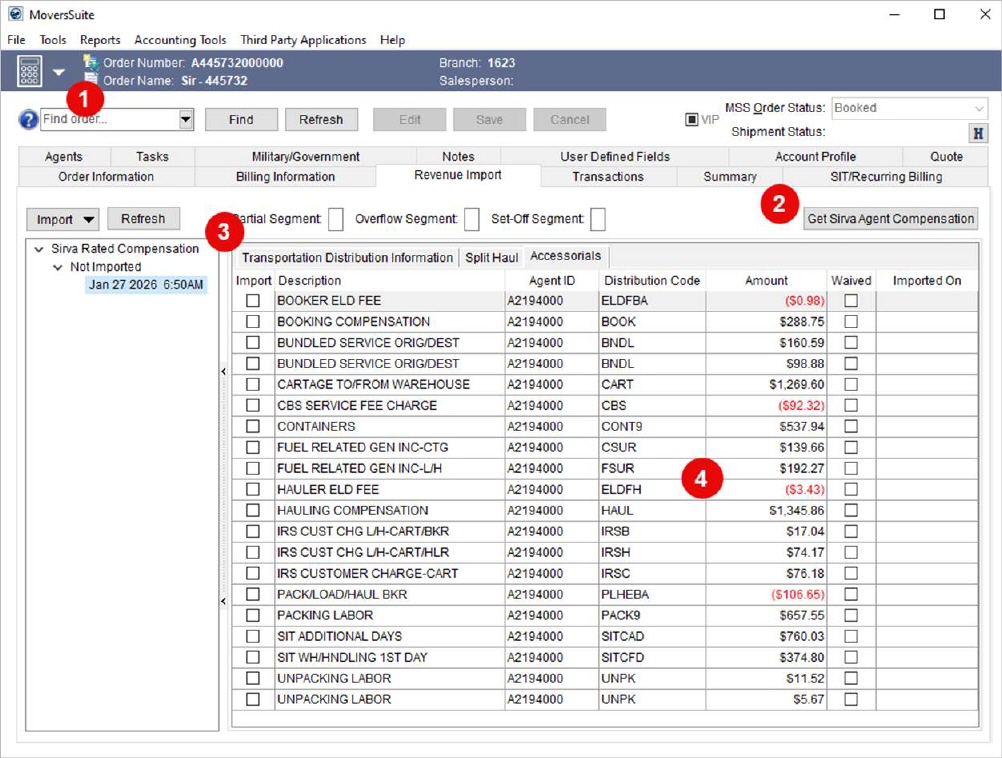
Generally, after the order has been abstracted in Sirva, this statement will be available to download into MoversSuite through the Get Sirva Agent Compensation option within the Revenue Import tab.
This is the earliest snapshot of what needs to be paid to drivers.
TECHNICAL NOTE:
Twice a month (in two halves of the month), the Agent Statement Published dates can be viewed using TheConnection Agent Settlement Dates. You can check these files to see whether your order is available for manual download through the Get Sirva Agent Compensation option within the Revenue Import screen in MoversSuite.
To bring in the Agent Compensation:
1. Open the Revenue Import tab in Revenue Entry for a Sirva order.
2. Press the Get Sirva Agent Compensation button.
3. Check the import listing to see if “Sirva Rated Compensation” appears. If not, check in Sirva for the current status of the order. You can also use the Refresh button adjacent to the Import button to check for any updates.
4. If available import it and process the items to build Transactions.
Figure 12: Revenue Entry > Revenue Import
RELATED INFORMATION:
SETUP INFORMATION:
Sirva Revenue Statement Import Setup
Sirva STS Integration Setup and Administration