MSWeb > Order Information order > Order Information > Order Story
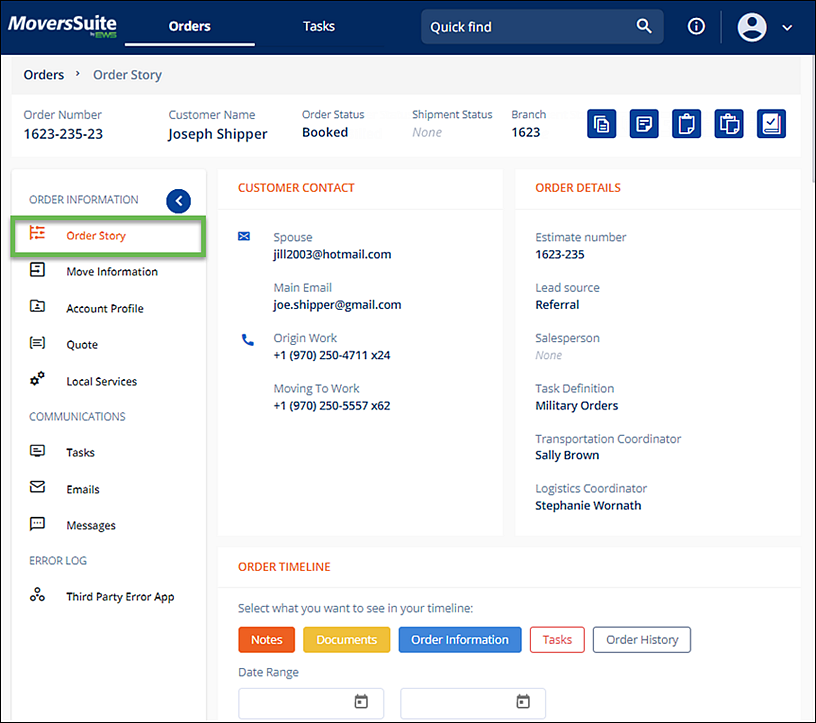
From the Navigation Menu, choose Order Story for an overview of information related to your Order Information order. Should the order on the screen be opened to an Office & Industrial order, the name of this section would be Job Story.
The Order Story organizes this information within the following sections:
•CUSTOMER CONTACT: The contact information that lists here is managed within Move Information > Customer Contact. See MSWeb Customer Contact for details.
•ORDER DETAILS: The information that lists here is managed within Move Information > Order Details. See MSWeb Order Details for more information.
•ORDER TIMELINE: Use search, the date range, and/or the buttons within Order Timeline to filter the events, docs, changes, etc. to populate the order with the information you need. Click all the buttons and a complete Timeline will list. See MSWeb Order Timeline for details.
Figure 22: Order Story
RELATED TOPICS