MoversSuite Administration > Administration > Third Party Application Setup
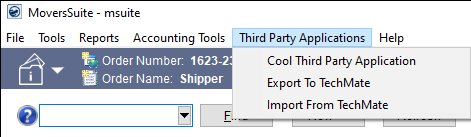
This Third Party Application Setup allows you define connections to third-party application(s) that support webhook connectivity. This process creates a dropdown option within the Third Party Applications Menu, executes a link to the third-party’s URL, and performs the login for a web-hook application. There is not a limit to number of connections that can be created.
Refer to Third Party Applications Menu (Web API Communications) for developer setup information.
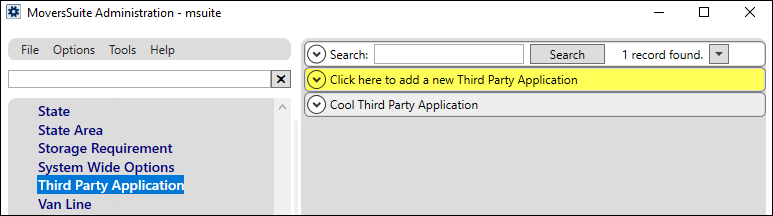
Go to MoversSuite Administration > Administration > Third Party Application Setup. Choose Click here to add a new Third Party Application.
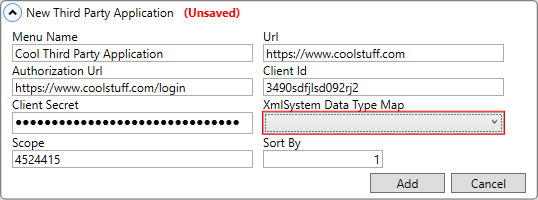
Complete the New Third Party Application screen. Click Add. When added, the record will be named the Menu Name; however, in the image below, the XmlSystem Data Type Map is required and the record will not save until that required field is added.
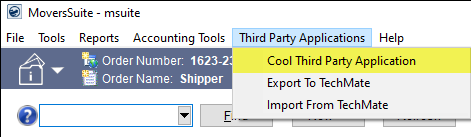
Now this option appears within the Third Party Applications Menu dropdown selector.
This section lists and describes the fields within the New Third Party Application screen:
|
Description | ||
|
Menu Name |
This name will appear as the name shown within the Third Party Applications Menu dropdown. The name can include up to 64 characters. | |
|
Url |
This is the homepage Url for the website to be accessed (up to 255 characters in length). | |
|
Authorization Url |
This is the login Url for the website to be accessed (up to 255 characters in length). |
|
|
Client Id |
This is the Username to be used to access this website (up to 1,000 characters in length). |
|
|
Client Secret |
If needed, this is the additional information that is sometimes needed to gain access to the website (up to 1,000 characters in length). This is not mandatory if this is not required to access the website. |
|
|
XmlSystem Data Type Map |
This is a required field. Select one from the dropdown menu. Options within the dropdown are set within Xml System Setup > XML System Data Map. |
|
|
Scope |
Scope is commonly used for server-to-server interactions that must run in the background, without immediate interaction with a user. A scope of up to 1,000 characters can be specified. |
|
|
Sort By |
This is a number field and it determines the sort order in the Third Party Application menu in MoversSuite. Enter “1” to list that record first, then “2” will list second, and so on. Within the Admin Tool, the sorting of items added will first sort by the Sort By field and then alphabetically. |
|
RELATED TOPIC:
Third Party Applications Menu (Web API Communications)