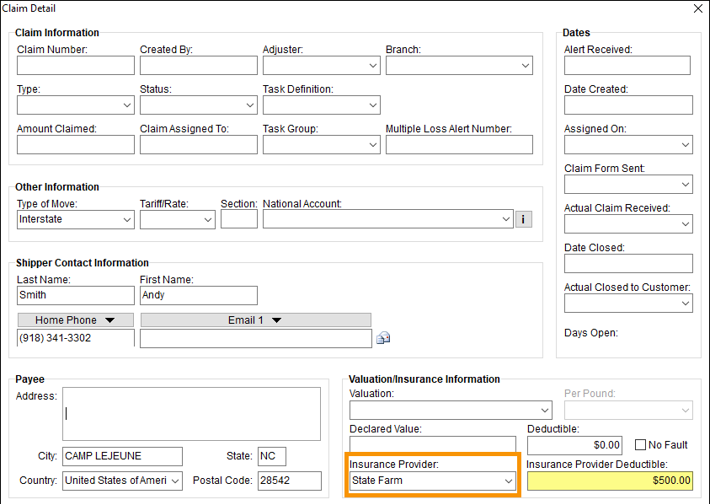
MoversSuite Administration > Claims > Claim Insurance Provider
Use this setup to define the options available within the Insurance Provider dropdown within Claim Detail > Valuation/Insurance Information section. If a deductible is set on the Claim Insurance Provider Setup record, it will auto-populate when that option is chosen from the Insurance Provider drop down.
This is an example of a Claim Insurance Provider Setup record. This record will list the option “State Farm” within the Insurance Provider dropdown.

To add a new Insurance Provider option:
1. At the top of the Claim Insurance Provider Setup screen, use Click here to add new Claim Insurance Provider.
2. Enter the name of the Insurance Provider within Provider.
3. Enter the deductible amount.
4. Click Add to save.

The technical table lists details for each field.
|
Field |
Description |
|
Provider |
Enter the name of insurance providers available within the Insurance Provider field in Claim Detail (up 128 characters). |
|
Deductible |
Provide an initial dollar amount of the deductible for this provider. The value entered here will appear within the Insurance Provider Deductible field in Claim Detail once the user selects the Insurance Provider. If no deductible is entered, it will default to zero. The deductible can be edited on the Claim Detail. |