This section lists the features, enhancements, and/or fixes added to MoversSuite and MoversSuite integrations.
MSO&ISales Integration
|
|
Multiple Origin/Destination addresses causing Data Warehouse Refresh issue |
If an order that comes down from MSO&ISales into MoversSuite containing more than one location marked as Origin or Destination, a unique key constraint violation would occur since Office & Industrial orders can only have one of either type. This violation showed up when administrators attempted to use the Data Warehouse Refresh.
MoversSuite was updated to only record a single Origin and a single Destination location during imports from MSO&ISales. Of note, MoversSuite recognizes the first Origin and Destination location that come down. Any subsequent locations that come down will be assigned as an “Other” location.
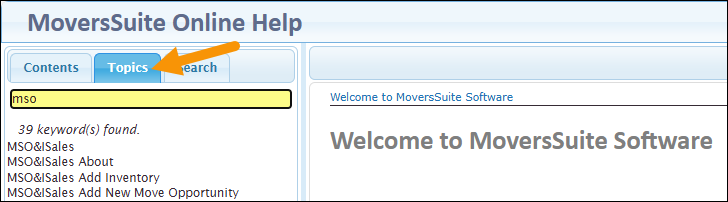
TIP: For information on MSO&ISales within the MoversSuite Online Help, use the prefix “MSO&ISales” – or just “MSO” - under Topics to see all the topics on that product.
RELATED TOPICS:
INTERNAL CASE: MOV-7500
Atlas Integration
|
|
Documents coming down on the correct order |
A change was made in a recent release that allowed MoversSuite to correctly identify any overflow orders associated with the main order segment. Prior to this update, overflow orders showed in MoversSuite as distinct, separate orders from the main segment. With changes made in this release, documents coming down from Atlas will go to the new “overflow order type” (detailed in the example below) instead of the old overflow orders. These documents will also show under the main order segment; therefore, you can always reference the main segment order to see all documents that came down for the order.
Example: If there is a main order segment in Atlas named “ARC173330” and overflow orders named “ARC173331” and “ARC173332”, then these three orders show in MoversSuite as:
ARC173330
ARC173330-1
ARC173330-2
Documents that come down for ARC173330-1 will show on that order and under ARC173330. The same is true for documents that come down under ARC173330-2: Documents will list within ARC173330-2 and ARC173330.
Note that documents linked to an overflow order of the original formatted style, e.g., ARC173332, for example, will show under the new formatted order, e.g., ARC173330-2, along with showing under the main order segment as well.
RELATED TOPICS:
INTERNAL CASE: MOV-7486