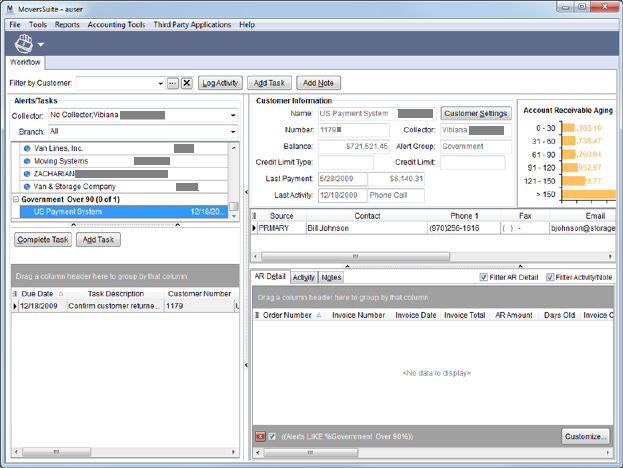
AR Credit & Collections provides a visual snapshot of customer standing in regards to company receivables directly linked with current Microsoft Dynamics GP data. Alert messages notify collectors when certain criteria warrant action and a task and activity system to ensure that users are on track and manage Account Receivables effectively.
AR Credit & Collections is accessible through the Contents Screen and the Accounting Tools Menu.
Figure 1: AR Credit & Collections
Key features of AR Credit & Collections:
•Alert messages based on accurate data notify collectors of needed action
•Instant access to accurate customer data directly from Microsoft Dynamics GP
•Module-specific tasks and activity systems provide a consistent and effective workflow for collectors
•Labor type assignment of “Collector” allows users to be assigned tasks and be associated to logged activities
•Users can create a single note, task, or log an activity related to multiple orders, invoices, and alerts
•Security controls based on AR Credit & Collection module assignment and manager flag setting
•Collection managers can assign collectors to customer accounts and update contact information
•Graphic display of account receivable aging data and alerts listing by customer
•Detail information provided on all orders linked to a selected customer including specific invoice and document data
•Output options include the ability to export grid data to Microsoft Excel and web browser in HTML and the ability to view and email order invoices
•Data warehousing feature avoids resource drain while ensuring that data is in sync with Microsoft Dynamics GP
•Screen splitters and expandable screen allows user to utilize entire desktop
•Immediate access to order personnel listing
•Customizable alert criteria and activity types
•Users can filter by customer, collector, and/or branch