Edit any scheduled message that has not already been sent. Edit the date to send, time to send, message, signature, or whatever information that pertains to that message.
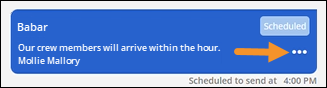
To edit a scheduled message, click the three dots to on the scheduled message to be edited.
Figure 228: Click ellipses to open menu.
From the opened menu, choose “Edit Scheduled Message.”
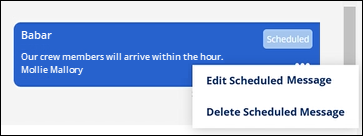
Figure 229: Use "Edit Scheduled Message" to change messages that have not yet been sent.
Clicking “Edit Scheduled Message” reopens the Schedule Send screen. Edits can be made to anything set on this screen before the message has been sent. Changes cannot be made after the message has been sent. Save to save the changes or cancel. If deleting the scheduled message, a confirmation warning will appear.
RELATED INFORMATION:
MSWeb Delete Scheduled Message