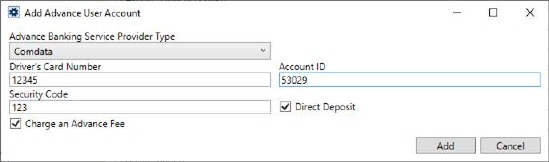
Utilize the Add Advance User Account screen through the Advance User Account section within the Advance tab of a Personnel Setup record. This screen is used to define information needed to support an employee to transmit advance data to Comdata or T-Chek.
The Add Advance User Account screen dynamically changes between the two options. If you select Comdata from the Advance Banking Service Provider Type dropdown, the screen asks you to provide the following fields:
Figure 37: Add Advance User Account - Comdata
|
Field |
Description |
|
Driver’s Card Number |
Provide the card number provided by the provider for the driver (up to 16 characters). |
|
Account ID |
Enter the unique identification for the driver provided by a banking services provider if uploading advance transactions to the banking service provider (up to 16 characters). |
|
Security Code |
Provide a Security Code for user account (up to 16 characters). |
|
Direct Deposit |
Checkmark this flag if you want to send advances to your employees via direct deposit. To be able to use this feature, make sure that the following conditions are met before you check this flag: 1. The employee is set up to receive direct deposits 2. The advance was created from a commission |
|
Apply the advance fee in Comdata Use this flag to determine whether to apply the fee to the amount sent to Comdata or not.
If the flag is checked, then MoversSuite sends over the full requested amount of the advance to Comdata. Comdata will deduct their fee on their side.
If the flag is not checked, then MoversSuite pulls in the fee from Comdata and deducts it from the requested amount.
Example: Requested advance amount: $500. Comdata fee: $2.00 If the flag is set, then MoversSuite sends $500 to Comdata. If the flag is not set, then Movers sends $498 to Comdata.
In either case, $498 will be uploaded to the driver’s (vendor) card.
The driver must be set up to receive advances and fees through Comdata. If they are not set up correctly, then errors will occur when Comdata advances are generated.
NOTES: •The fee is applied through the Comdata system, not through MoversSuite. •If you wish to have EWS Group set this flag on certain accounts, then open Help Desk case and include the Comdata Customer ID numbers for the accounts you wish to have the “Charge an Advance Fee” set for.
|
For T-Chek Advance Banking Service Type Provider, the following fields are to be supplied:
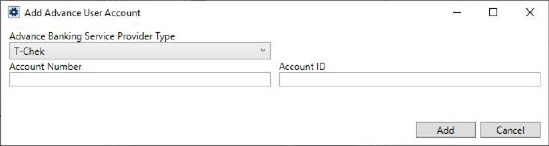
Figure 38: Add Advance User Account - T-Chek
|
Field |
Description |
|
Account Number |
Enter account number provided by a banking services provider if uploading advance transactions to the banking service provider (up to 16 characters).
NOTE: More than one driver can reference the same Account Number.
|
|
Account ID |
Enter the unique identification for the driver provided by a banking services provider if uploading advance transactions to the banking service provider (up to 16 characters). |
Refer to Comdata Integration for more information.
RELATED TOPICS: