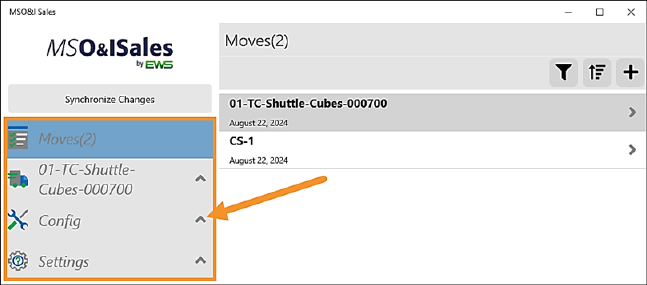
The menu is organized under three sections: Moves, Config and Settings. Click the dropdown icon on the right of each tab to open that section.
Figure 48: Click expand icon to open tabs within MSO&ISales Menu.
Some section (the tabs) and subsections have information detailed within the following Online Help Topic Names. As a reminder, search for the Topic Names under the Topics tab in the Online Help.
|
Section |
Section OH Topic |
Subsection |
OH Topic Name |
|
Moves(#) |
Move Details |
||
|
Quotes |
|||
|
Survey Sheets |
|||
|
Job Walk |
|||
|
Job Summary |
|||
|
Crew Calculations |
|||
|
Cost Summary |
|||
|
Print Move Summary |
| ||
|
Reports |
| ||
|
Config |
Master Data |
||
|
Custom Inventories |
|||
|
Pricing |
|||
|
Job Setup |
|||
|
Sales Tax |
| ||
|
Conversions |
| ||
|
Picklists |
|||
|
My Information |
|||
|
Configuration Profiles |
|||
|
Customers |
|||
|
Settings |
Backups |
||
|
Support |
|||
|
About |
|||
|
Sign Out |
|
RELATED INFORMATION
MSO&ISales Process Flow