
This section lists the improvements made within MoversSuite Administration (also known as the Admin Tool.)
Order Status Setup
A new “Inactive” flag is available on Order Status Setup records.
Checking an Order Status Setup record as Inactive makes that option no longer available as a selection within MoversSuite as well as in other administrative setup areas.
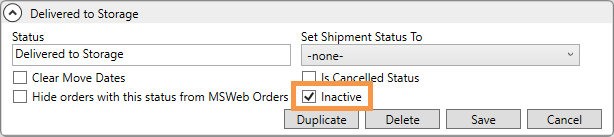
Figure 6: Order Status Setup
Some of the common places affected by this option include the following:
Other fields, reports, and views affected by this change are listed within the Order Status topic.
How to see Inactive status values in Order Status Setup:
Once a record is marked Inactive, it will no longer show in the Order Status Setup listing within the Admin Tool. The record, though, can still be viewed within Order Status Setup by:
•Using the Mass Record Selection Options > Show All Items options, or
•By using the Advance Search option (clicking the down arrow beside Search to open the Advance Search options) and checking the Inactive flag to view just the records marked Inactive.
INTERNAL REFERENCE: MOV-2361
RELATED INFORMATION: