
Use the Financial Information screen to set and view financial data associated to the international order, including a Global Protection Plan (GPP). This information is utilized when exchanging data with external applications.
Access this screen through the Financial Information button found on the Shipping Information tab.
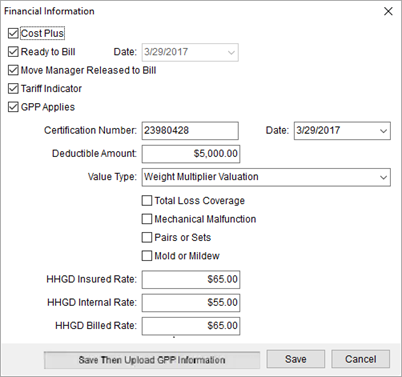
Figure 16: Financial Information screen
Technical Field and Function Information
Described in the table below are the fields and functions available to the Financial Information screen.
|
Field/Function |
Description |
|
Cost Plus |
Check this flag to indicate Cost Plus financing on the shipment. |
|
Ready to Bill Date |
Check this flag to indicate that the order is ready to be billed. Setting this flag also sets the associated date to the current date. |
|
Move Manager Released to Bill |
Checking this flag indicates that the move manager has released billing. |
|
Tariff Indicator |
Check this flag to indicate that a tariff applies to the shipment. |
|
GPP Applies |
Check this flag to indicate that a Global Protection Plan applies to the shipment. All remaining settings on this screen relate to the Global Protection Plan. |
|
Reason Declined |
If GPP Applies is unchecked, then specify a reason that the Global Protection Plan was declined from the options defined within Valuation Declined Reason Setup. |
|
Certification Number Date |
Provider the certification number for the GPP (up to 64 characters) and the date of the certificate. |
|
Deductible Amount |
Enter the deductible amount of the Global Protection Plan certificate. |
|
Value Type |
Select a type associated to the Global Protection Plan from options defined within Value Type Setup. |
|
Total Loss Coverage |
Check this flag to indicate that total loss coverage applies to the Global Protection Plan. |
|
Mechanical Malfunction |
Check this flag to indicate that mechanical malfunction coverage applies to the Global Protection Plan. |
|
Pairs or Sets |
Check this flag to indicate that pairs/sets coverage applies to the Global Protection Plan. |
|
Mold or Mildew |
Check this flag to indicate that mold/mildew coverage applies to the Global Protection Plan. |
|
HHGD Insured Rate |
Enter the household goods insured rate amount. |
|
HHGD Internal Rate |
Enter the household goods internal rate amount. |
|
HHGD Billed Rate |
Enter the household goods billed rate amount. |
|
|
Save Keep changes made and close the screen. |
|
|
Save Then Upload GPP Information Save the changes and upload the information for GPP Certificate |
|
|
Cancel Close the screen without saving changes. |


