
This section lists the fixes made to MSWeb.
New Buttons
New buttons on the order header!
The Create Order, Create Duplicate Order, Book Order, and Re-Book order buttons on the MSWeb header.
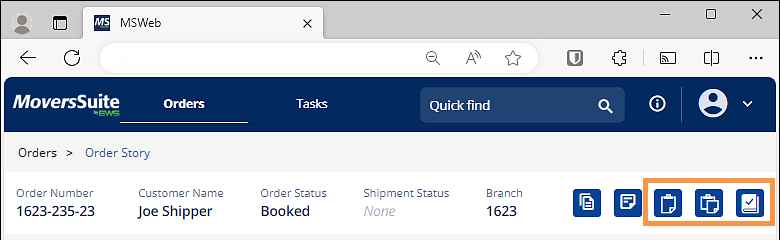
Hover over each icon to see its functionality. The functionality for each icon is described below.
|
Icon |
Description |
|
|
Create Order Click to create a new order or lead. |
|
|
Create Duplicate Order Click to open the Create Duplicate Order dialog which prompts a user to select the level of detail to add to new order. |
|
|
Book Order Click to book the lead and create the order. |
|
|
Re-Book Order Click to re-book the order. |
INTERNAL REFERENCE:
MOV-6692
Local Services

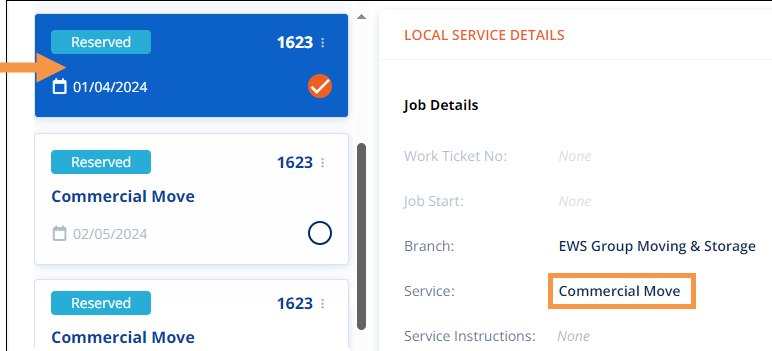
Local Service Type should be listed on the Local Service card when the card is selected.
When a Local Service was chosen, indicated by the checkmark on the card, the Local Service description would disappear on that card. Notice in the image below that the card does show “Commercial Move?” This has been fixed and the Local Service description will appear on the card.
INTERNAL REFERENCE:
MOV-6883
Document Management

Filenames with a “#” in the name were causing errors within the Legacy (desktop) application.
When a file was added within MSWeb with a name that included the pound sign (“#”), an error would appear in the Legacy application side; however, should the same name be used when adding a file using the Legacy application (desktop), it would work fine. The error would read: Object reference not set to an instance of an object. The fix requires MoversSuite to drop the “#” from the name when it is used to prevent the error.
RELATED INFORMATION:
Filename Characters Not Supported
INTERNAL REFERENCE:
MOV-6995
Using MSWeb

Multiple fixes have been resolved.
The following issues were fixed to improve the user experience:
•Using Tab to move from one field to another is improved.
•The calendar ripple, the circular halo around the calendar icon, has been reinstated.
•When using the delete icon, the animation was not correctly rendering.
•Alignment issues within the Agents selection (within SIT) has been corrected.
•Within Move Information, after entering Billing Information, an extra click was needed to proceed.
•In certain situations, adding military score caused multiple errors.
INTERNAL REFERENCE:
MOV-6928, MOV-7036, MOV-7045, MOV-7049, MOV-7054, MOV-7055


