
This section lists the features added to MoversSuite and MoversSuite integrations.
Release Overview Video
Remedy

Remedy now allows pre-authorizations for credit card and credit card captures.
In addition to processing credit card payments, Remedy Payments now processes credit card authorizations and credit card captures (see Credit Card Capture without Payment.) Authorizations are not payments. They are used to “pre-authorize” an amount or put the amount “on hold” on a card. Payment is processed later.
To process an authorization:
1. From Credit Card/Bank Payment or Authorization:
•Choose a Remedy payment method for Payment Information on Hand.
•Check the Authorize Only box.
•Enter an Authorization Amount.
•Click Authorize.
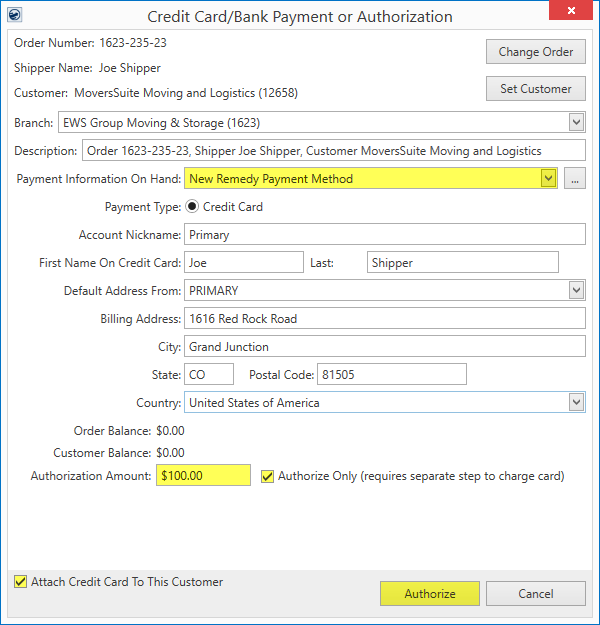
When the Authorize Only checkbox is clicked, two things happen: the Payment Amount becomes Authorization Amount, and the Payment button is now named Authorize. Also, it is suggested that the Attach Credit Card To This Customer is checked to associate the payment information referenced for this transaction with the customer for future payments. If checked, the payment information will be available as a payment option on other orders that are using this exact customer number.
When the Authorize button is clicked, if the card has not been processed before, the Electronic Capture Processing Page is prompted. Enter the credit card information. If the card has been processed successfully before and it is listed within Payment Information On Hand, the authorization is processed without having to complete the Electronic Capture Processing Page again. The authorization is successfully completed when the Electronic Authorization Success screen appears.
2. The Authorization is processed into a payment using Complete Authorized Payment. Of note, the payment processed cannot exceed the authorized amount. If the amount does need to be larger than the authorized amount, the authorization must be revoked using Complete Authorized Payment, and a new authorization processed through Credit Card/Bank Payment or Authorization.
If interested in having the ability to process authorization and credit card captures through Remedy Payments:
1. Contact Remedy to enable authorizations and credit card captures for your account.
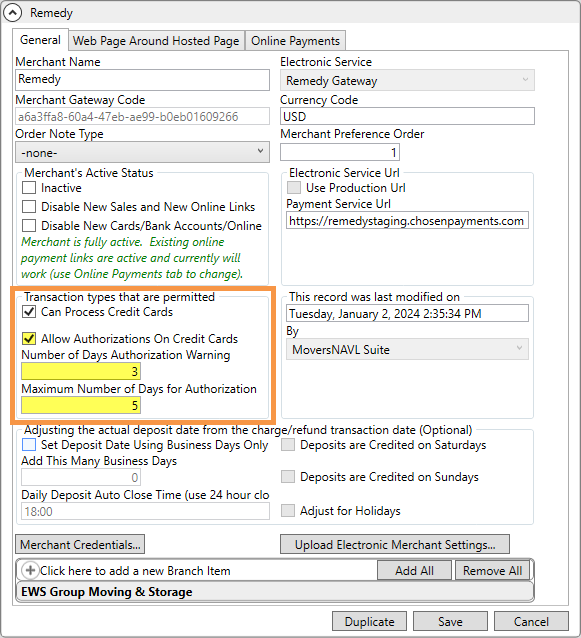
2. Once updated, a few details need to be updated within your Electronic Merchant Setup record. From the Electronic Merchant Setup record (for Remedy) and within the Transaction type that are permitted section:
•Check the Allow Authorizations On Credit Card box. This step is required for this functionality.
•The Number of Days Authorization Warning and Maximum Number of Days for Authorization fields are not required but highly recommended. The warning message refers to a warning that will appear within Complete Authorized Payment notifying you that the authorization needs has not been processed. The Maximum Number of Days field is the number of days that the authorization can be processed. Once the number of days has passed, the authorization is expired and must be revoked within Complete Authorized Payment screen.
RELATED INFORMATION:
Electronic and Online Payments Setup (Remedy)
INTERNAL REFERENCE:
MOV-6977
Quickbooks

MoversSuite is upgraded to version 14.6.3.6.
INTERNAL REFERENCE:
MOV-6997
MSCrew 
Time Punches were not being removed after being imported to PayCom.
After time punches were transmitted to PayCom, those punches did not disappear from the Export Punches to Payroll screen as they should have. This could have resulted in duplicate punches to PayCom if transmitted again. This has been fixed so time punches will be removed from the Export Punches to Payroll screen once the import is transmitted to PayCom.
INTERNAL REFERENCE:
MOV-6884