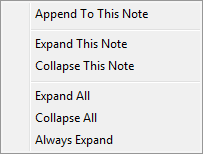
The following image displays the right-click options available to users within the Notes tab.
Figure 8: Right-click options for Notes
The following table describes the options available to users through a right-click on a selected record in Notes.
|
Option |
Description |
|
Append To This Note |
This option opens the Add Note dialog allowing the user to create an appended comment to the selected note. |
|
Expand This Note |
This option causes the grid to open the details of selected note |
|
Collapse This Note |
This option causes the grid to close the details of selected note. |
|
Expand All |
This option opens the details of all notes in the data grid. |
|
Collapse All |
This option closes the details of all notes in the data grid |
|
Always Expand |
When this option is selected ( |
 ), each time the current user accesses
the particular note data grid the details of all notes will
display.
), each time the current user accesses
the particular note data grid the details of all notes will
display.