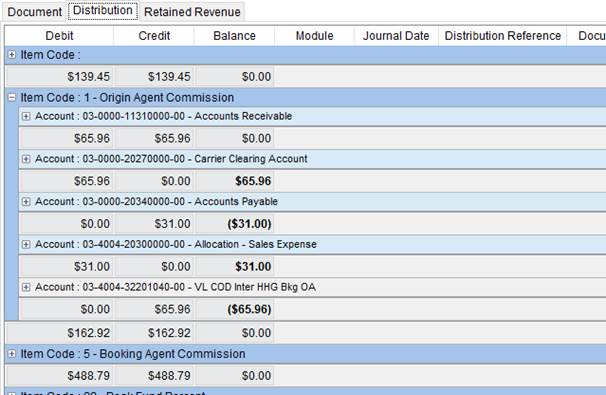
The Distribution tab available through Dynamics GP Order Inquiry displays detailed posting information based on a selection made within Distribution Views.
Figure 66: Distribution tab
The following Distribution Views are available.
|
View |
Description |
|
Item Code Account |
Select this option to create report groups on Item Code and then Account. |
|
Module Item Code |
Select this option to group by Module, then Customer/Vendor Name, then Item Code, and then Account. |
|
Module |
This option groups the data by Module then Account. |
|
Account |
This options groups the data by Account. |
|
Module Account |
Select this option to group by Module, then Customer/Vendor Name, and then Account. |
|
Item Code |
This options groups the data by Item Code. |
|
User Defined |
This option displays all documents and allows user to evoke sorting, filtering, and grouping of the data. See Data Grids for more options. |
The following table describes the fields available within the Document tab.
|
Field |
Description |
|
Debit |
The amount of the debit transaction processed for the item. |
|
Item Code |
The code followed by the description set within Item Code Setup displays in this column. |
|
Credit |
The amount of the credit transaction processed for the item. |
|
Balance |
The amount remaining on the item to receive or to be paid displays in this column. |
|
Module |
This column displays the Microsoft Dynamics GP module that the transaction was processed. |
|
Account |
The general ledger account and description used to post the item within Microsoft Dynamics GP. |
|
Journal Date |
The effective posting date of the transaction displays in this field. |
|
Distribution Reference |
This column displays the reference title given to the distribution item through Microsoft Dynamics GP. |
|
Document Number |
The unique document number assigned to the transaction through MoversSuite displays in this column. |
|
Branch |
The branch of service that the transaction was processed under displays in this column. |
|
Document Type |
This column displays the type of transaction that the item posted with in Microsoft Dynamics GP. |
|
Customer/Vendor Number |
The identification number of the customer or vendor assigned to the transaction item displays in this column. |
|
Customer/Vendor Name |
The name of the customer or vendor assigned to the transaction item displays in this column. |
|
Invoice |
The invoice number assigned to the item through MoversSuite displays in this column. |
|
Invoice Date |
The date that the item was invoiced displays in this field. |
|
Document Date |
The creation date of the MoversSuite document related to the transaction displays in this field. |
|
Voided |
A flag will be set within this column to indicate
whether the item was voided ( |
 ) or
not (
) or
not ( ).
).