This section lists the features added to MoversSuite.
Administration: Material Type Setup
Material Type Setup can be assigned to modules and made Inactive.
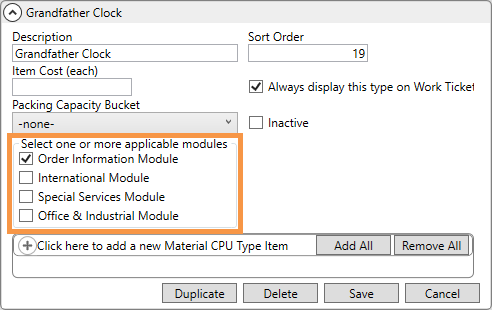
As drop-down menus for selecting CPU items are quite extensive and time-consuming to navigate (especially after adding the O&I module), this new feature allows each material type to show only in the module(s) you choose. The new Material Type Setup option of Select one or more applicable modules is perfect to making your CPU dropdowns more efficient.
From Material Type Setup, choose a record and select the “one or more applicable modules” for that record. In the example below, Grandfather Clock is set to only the Order Information Module, so Grandfather Clock will no longer show as an option within CPU dropdowns for the other modules.
The Inactive flag is now also available to Material Type Setup. Checking the new Inactive option on a Material Type record will remove that record from being available in areas within MoversSuite Administration nor any service or module within MoversSuite. Should an attempt be made to make a Material Type inactive that is in use, an error will appear at the bottom of the screen.

MOV-6705