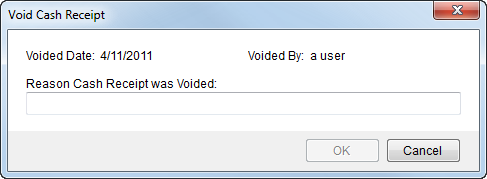
Users can void open receipts through the Void Cash Receipt option in Cash Receipts.
|
Note |
|
You can void a batch through Payment Management as long as the Cash Receipt Status is not “Voided.” |
Figure 7: Void Cash Receipt screen
The following table describes the fields and functions available within the Void Cash Receipt screen.
|
Field/Function |
Description |
|
Voided Date |
The date that the receipt was voided displays in this field. |
|
Voided By |
This field displays the name of the user who performed the void. |
|
Reason Cash Receipt was Voided |
Enter text explaining the reasoning behind voiding the receipt (up 1024 characters). See Accounting Note for information on the type of note generated by the void. |
|
|
OK Press OK to proceed with voiding the receipt. |
|
|
Cancel This function discards the request to void the receipt. |

