 .
Hover over any of the icons in the collapsed view for a pop-up to remind you
what it is.
The Navigation Menu on the left of the Order Story page directs you all the functionalities of MoversSuite. Click the name, for example, Move Information, to quickly access that area. A table follows to identify each area that each topic contains.
The Navigational Bar is also collapsible and
expandible by clicking blue arrow .
Hover over any of the icons in the collapsed view for a pop-up to remind you
what it is.
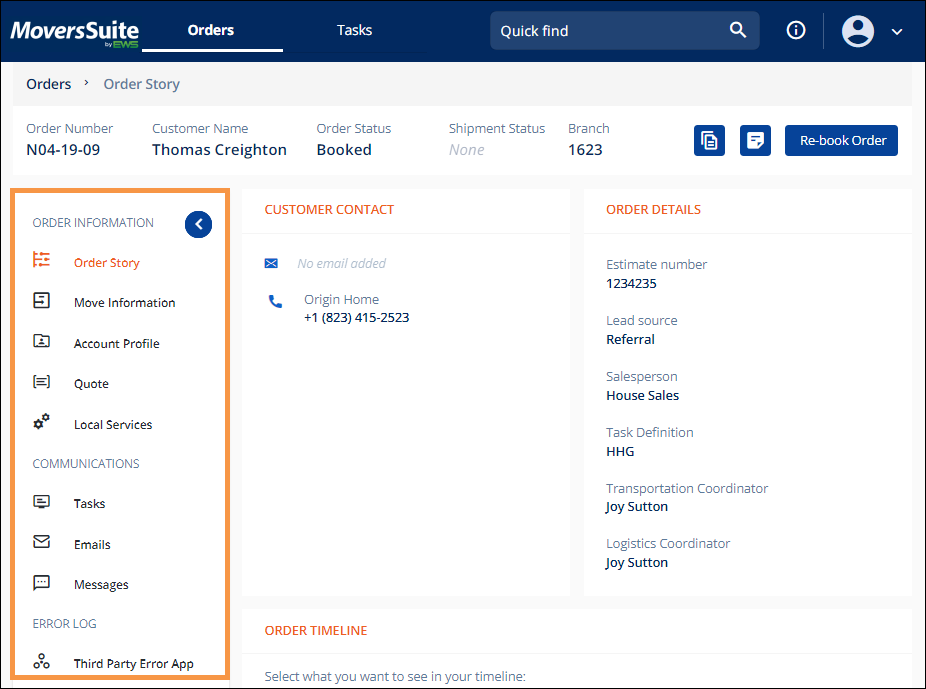
Figure 11:Navigation Menu
The following table describes sections and topics used in the Navigational Bar.
|
ORDER INFORMATION | |
|
FIELD |
DESCRIPTION |
|
Order Story |
Click to go to, update and/or edit: •Customer Contact •Order Information •Order Timeline |
|
Move Information |
Click to go to, update and/or edit: •Customer Contact •Order Information •Locations (Move From, Move To and Extra Stop) •Agents •User Defined Fields •Materials •Packing •Military •Order Personnel •New Section (Service Tiles) |
|
Account Profile |
Coming soon. |
|
Quote |
Coming soon. |
|
Local Services |
Click to go to, update and/or edit: •Service Timeline •Status selectors •Local Service Details (Job Details, Date Details, Day Notes, Crew Calculations) •Locations •Additional Details (Service Tiles) |
|
COMMUNICATIONS | |
|
Tasks |
Coming soon. |
|
Emails |
Coming soon. |
|
Messages |
Coming soon. |
|
ERROR LOG | |
|
Third Party Error App |
|