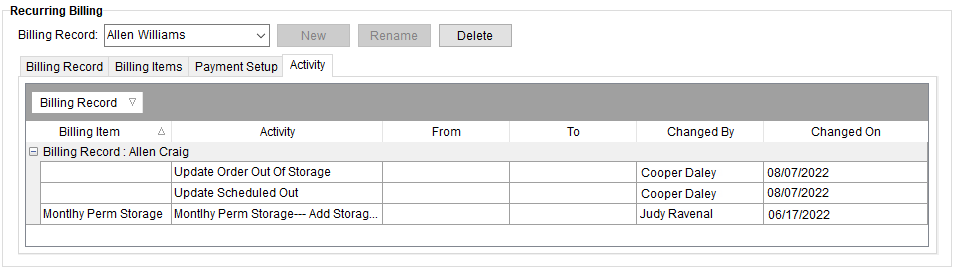
The Activity tab is located under Recurring Billing. The Activity tab will list all changes made to a billing record or one of its billing items.
Figure 22: Activity (Recurring Billing) tab
Technical Field Information
The following table describes the data available within the Activity tab.
NOTE: This is a full function data grid where users can sort, filter, and group data. See Data Grids for more information.
|
Field |
Description |
|
Billing Record |
Displays the Name of the record established within Billing Record. Note: Billing Record is the default filter for the record when a user enters the Activity tab. |
|
Billing Item |
Displays the name of the individual items belonging to the record as established in the Billing Items tab. |
|
Activity |
This column displays a description of the change made. |
|
From |
This column displays the field value before the change took place. |
|
To |
This column displays the field value after the change. |
|
Changed By |
Displays the username of the person logged into MoversSuite that performed the change. |
|
Changed On |
Displayed in this column is the date and time the user made the change. |