This section lists the enhancements made to MoversSuite.
Recurring Billing: Mandatory Fields Updated
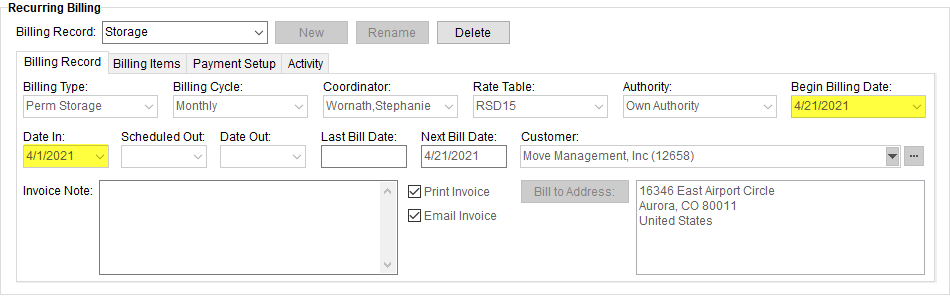
The Recurring Billing section of the MoversSuite application has been updated to have the following fields marked as mandatory, in order to make the storage run process more fluent:
•Begin Billing Date
•Date In
Figure 2: Billing Record in Recurring Billing
If you try to save a new or existing Recurring Billing record without these fields entered, an error message appears prompting you to fill these fields.
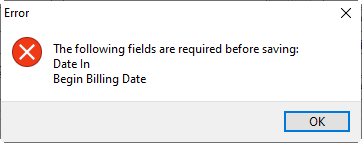
Figure 3: Error dialog
NOTE: Other fields that are required when entering a new Billing Record are the Billing Type and Billing Cycle.
Refer to Recurring Billing topic for more details.
|
SUMMARY (5187) |
|
Recurring Billing: Mandatory fields updated. |
|
The following areas have been affected by this change:
|
Forms Designer Bookmarks Enhancements
Two new bookmarks have been added in the Quote Bookmarks category of the Forms Designer Bookmarks.
|
Bookmark Name |
Corresponding MoversSuite Location |
|
Quote Description |
Quote > Description |
|
Quote Details Show Hidden Items |
Produces the same grid as the Quote Details but shows the detail items of any group that is marked as “Hidden.” Quote > Item # (Item Code) Quote > Description Quote > Quantity (first quantity) Quote > Quantity (second quantity) Quote > Rate Quote > Amount Quote > Note
NOTE: All hidden items (items can be hidden in a quote group by selecting “Hide Details” when creating a quote group.
|
Moreover, a bold “Total” line has been added at the bottom of the “Quote Details” and “Quote Details Show Hidden Items” bookmarks, which displays a sum of the quote group amounts.
The following image displays a “Hidden” group rendered through the Quote Details bookmark and through the Quote Details Show Hidden Items bookmark for comparison.
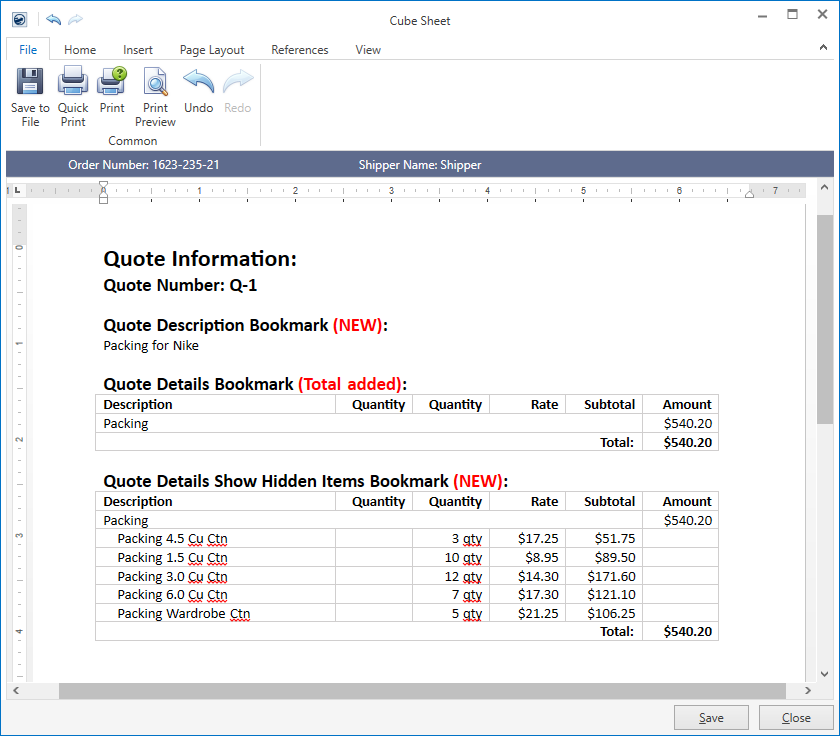
Figure 4: Rendered quote example
Refer to the following topics for related information:
|
SUMMARY (5962) |
|
Forms Designer Bookmarks enhancements. |
|
The following areas have been affected by this change:
|
BI Tool Updates
In order to provide a better user experience, the following Enterprise BI Views have been updated (followed by detailed information on each):
Cash Receipts
Crew Actuals
Order Information
Revenue Entry
Revenue Entry Revenue Only
Task Information
Cash Receipts View Updates
“OrderBranch” is now available as a column within the Cash Receipts view. This column displays the branch set on the order for each item being viewed. NOTE: The “Branch” column on this same view displays the branch associated set for the payment batch.
REFERENCE: MOV-6064
Crew Actuals View Updates
You can now retrieve the name set on the order through this view. The following columns are now available through the Crew Actuals view:
“ShipperName” displays the complete name from the Name, Address, Phone tab or Contacts and locations tab formatted with the First Name/MI followed by the Last Name/Company Name field.
“LastName” displays the value set for the Last Name/Company Name field from within the Name, Address, Phone tab or Contacts and locations tab.
“FirstName” displays the value set for the First Name/MI field from within the Name, Address, Phone tab or Contacts and locations tab.
REFERENCE: MOV-6183
Order Information View Updates
The “Email” column now displays all email addresses defined on an order through Name, Address, Phone. The appear within this column in the order they are prioritized on the order are separated by a carriage return and line feed (to help you discern them quickly on any output you develop).
TECHNICAL NOTE: GetAllOrderEmailAddresses function was added to retrieve the list of email addresses.
REFERENCE: MOV-6035
A “Phones” column is now available to display all phone numbers set on an order through Name, Address, Phone. Each phone number assigned displays in the order in which is ranked and is separated by a carriage return and line feed (to help you discern them quickly on any output you develop).
TECHNICAL NOTE: GetAllFormattedOrderPhoneNumbers function was added to retrieve the list of phone numbers.
REFERENCE: MOV-6160
Revenue Entry View Updates
The “ActualLoadDate” column is available in this view. It populates with the date set within the Load Dates field of the Actual tab within the Move Information tab.
REFERENCE: MOV-6145
A new column titled “RevenueGroupInvoiceDescription” is a now available that displays the Invoice Description set within the Add Revenue Group dialog.
REFERENCE: MOV-6211
The “RevenueGroup” column now displays the permanent Revenue Group value set within the Add Revenue Group dialog.
REFERENCE: MOV-6211
Revenue Entry Revenue Only View Updates
A new column titled “RevenueGroupInvoiceDescription” is a now available that displays the Invoice Description set within the Add Revenue Group dialog.
The “RevenueGroup” column now displays the permanent Revenue Group value set within the Add Revenue Group dialog.
REFERENCE: MOV-6211
Task Information View Updates
New column titled “Priority” is available that displays Priority set on a task within the Tasks tab or Tasks Module.
Moreover, the "TaskComplated" column has been renamed to "TaskCompleted" within the Task Information view.
REFERENCE: MOV-6013
|
SUMMARY (6013, 6035, 6064, 6145, 6160, 6183, 6211) |
|
BI Tool Updates. |
|
The following areas have been affected by this change:
|
TechMate Integration: Support for Salesmate iPad
For users using TechMate Integration, MoversSuite now supports a new SystemCode of “iP”. This will smoothen the TechMate downloads, especially downloads from Salesmate iPad devices.
Refer to TechMate Integration for more details.
|
SUMMARY (6167) |
|
TechMate Integration: New SystemCodes supported. |
|
The following areas have been affected by this change:
|