

Watch the Overview Video for this release
This section lists the improvements made to MoversSuite.
|
|
Watch the Overview Video for this release |
Payment Management
Progress bars terminate on 100% completion
The MoversSuite application now handles progress dialogs more effectively. Prior to this release, certain progress dialogs, such as the Checking for Errors dialog in Payment Management, would remain open and people were unable to close them.
Given below is a list of such progress bars that were affected:
Payment Management: Progress bar that shows UniGroup or Allied/STI/Sirva statement import and the progress bar that shows an Atlas or generic CSV file statement import.
Cash Receipts: The auto-apply documents progress form.
Additionally, there are some dialogs that were similarly just discarded without being hidden or they were simply hidden and never discarded (consuming memory until MoversSuite was closed). Now, they are all hidden and then discarded. Given below is the list:
Container Management: The Quick find Help dialog.
AR Credit & Collections: The report form.
Order Information: The Quick Find Help dialog
Job Costing: The report form.
Order Details form.
Local Dispatch: The requested services form.
Dynamics GP Order Inquiry: The order inquiry module.
AR Credit & Collections: Order Personnel form in customer details frame.
Order Information and Claims: The order personnel form is now hidden before it is deleted if the user wants to switch to another module with that form open.
REFERENCE: 5881
Techmate Integration
County field imports into MoversSuite
The County field now imports into MoversSuite to populate the County field in the following locations:
Name, Address, Phone > Moving From > County
Name, Address, Phone > Moving To- Primary > County
Name, Address, Phone > Moving To - Secondary > County
Moreover, the import includes County fields from the Extra Stops too.
REFERENCE: MOV-5914
Crates field imports smoothly
The Crates field is now imported smoothly without producing any errors. Previously, some errors were being reported in cases when Crates were listed in Containers section. Moreover, appropriate error message is produced in case of wrong Item Code mapping.
REFERENCE: MOV-5914
Address Line 2 field exports to Techmate
The Address Line 2 field from MoversSuite (Name, Address, Phone tab) now exports to Techmate. Previously only the Address Line 1 field was exported.
REFERENCE: MOV-5874
Estimated Weight field imports in the correct field
The Estimate Weight field from Techmate now imports correctly into MoversSuite’s Estimated Weight field. Previously, it was populating the Hauled Weight field.
REFERENCE: MOV-1554
Notes field exports as per Vanline codes
The Notes are now exported based on their Vanline codes. For each note being exported, MoversSuite now scans and exports only the following three Vanline codes.
TMCustomer
TMEstimate
TMSurvey
For example, if a ‘Sales Lead’ note is created (with a Note Type = ‘Lead’) it should have any of the above-mentioned van line codes in order to get exported.
REFERENCE: MOV-5823
Error message for duplicate branches with no agents updated
If a Branch Setup record with “None” set in the agent dropdown is duplicated, a more descriptive error is now shown, informing users that a record having “None” set as the agent is already defined.
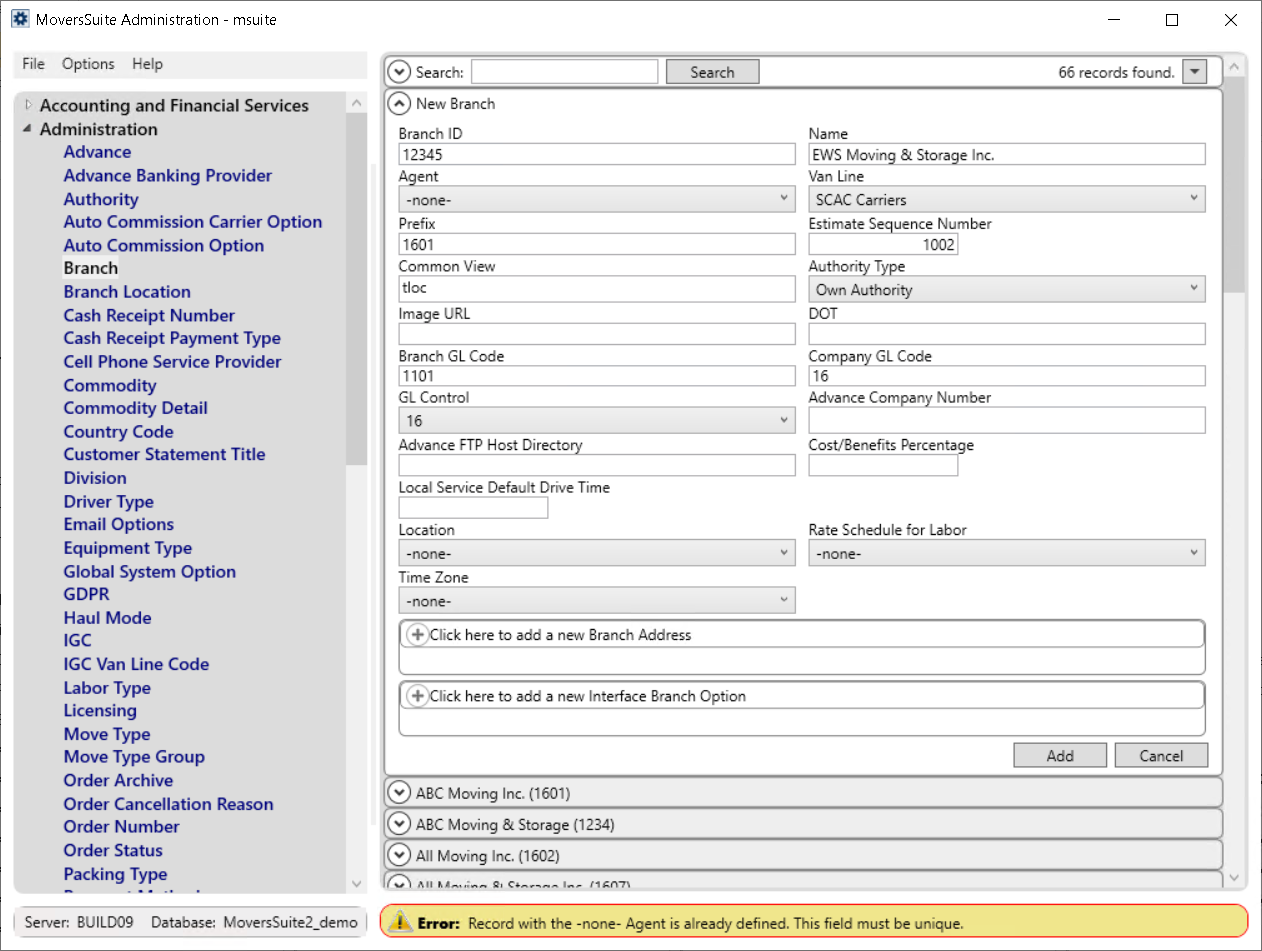
Previously, the error shown in this case was not elaborative.
REFERENCE: MOV-5929