This section lists the enhancements made to MoversSuite.
Third Party Application Error Management Screen Updated
Several updates have been made to Third Party Application Error Management screen to let the users process the errors faster and to screen out unwanted errors.
Improved Filtering of Errors
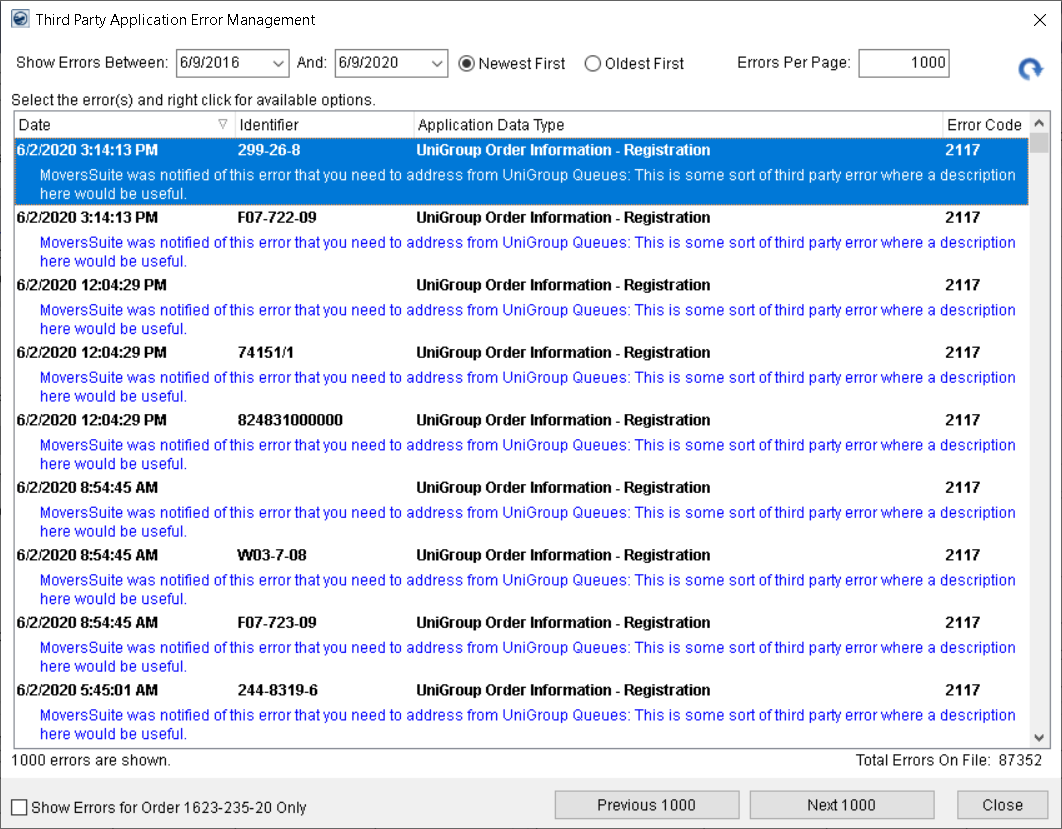
The Third Party Application Error Management screen has been upgraded to let you conveniently filter the number and date range of errors to be displayed.
Figure 1: Third Party Error Management screen
You can filter the errors through 4 new options:
Show Errors Between
Use the Show Errors Between date selectors to filter the errors between dates of your own choice. If left unchanged, the date selectors default to past 4 years.
Previous/Next Errors
For error listings comprising of multiple pages, the Next and Previous buttons help you navigate between the pages. The button labels are dynamic and are updated according to the errors per page count. As the Errors Per Page is set to 1000 by default, the Previous and Next button labels also default to “Previous 1000” and “Next 1000”.
Newest First/Oldest First
Use the Newest First or Oldest First radio button to control which end of the date range you want to start from. The filter considers the first date range selector as end date and the second one as the start date. With the Newest First radio button checked, the screen displays the latest errors and using the Next button takes you to older errors. Contrarily, with the Oldest First option selected, you can see the oldest errors and using the Next button will display newer errors.
By default, the Newest First option is checked. This option lets you re-process all the errors from the past with the proper use of date selectors. You can make use of the Errors Per Page option to process a manageable batch of errors.
Note: It is suggested to process a batch of maximum 20,000 errors at a time.
Errors Per Page
Use the Errors Per Page filter to provide a minimum of 1 and maximum of 999999999 errors. By default, it is set to 1000 errors, but it is suggested to view errors in smaller and manageable batches.
The total count of all errors is also displayed at the bottom left of the screen. If the errors retrieved are not more than 1 page, the following options are no longer shown on screen:
•Show Errors Between
•Previous/Next Errors
•Newest First/Oldest First
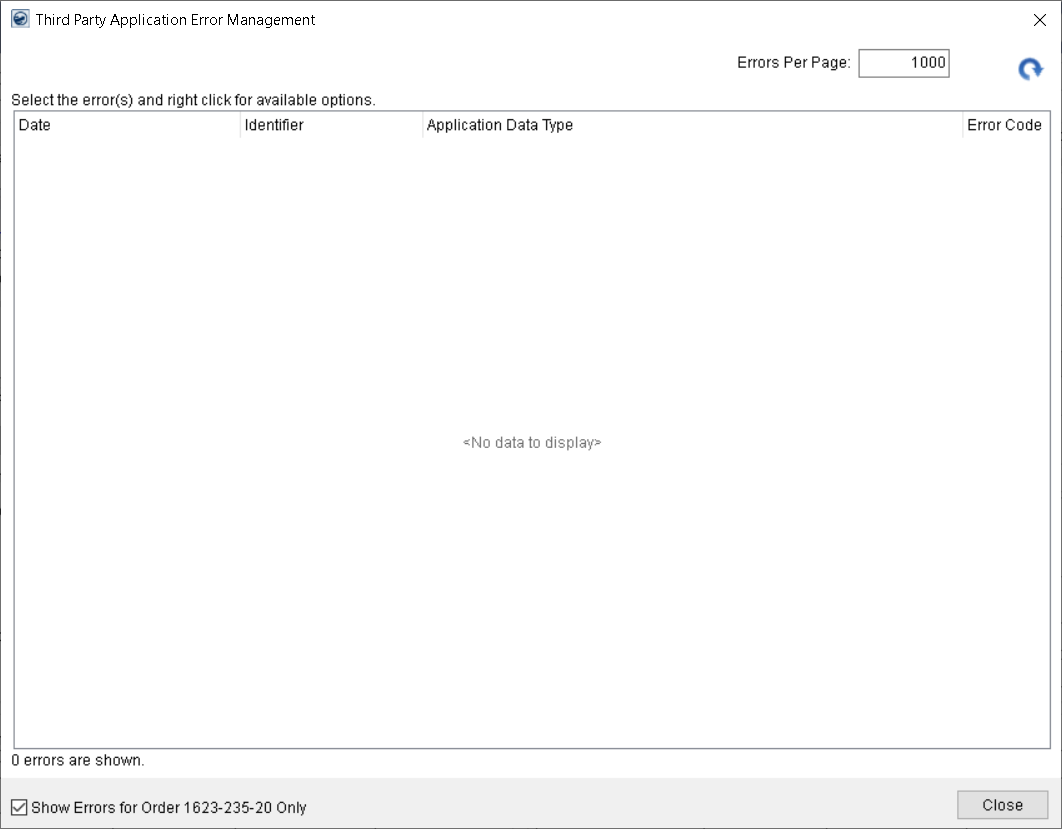
Figure 2: Third Party Application Error Management screen
"Show Errors for This Order” flag added
To screen out unwanted errors from the Third Party Application Error Management screen, a new flag by the name of “Show Errors for Order XXXX-XXX-XX Only” has been added for the selected order number. When checked, the screen will only retrieve and show the errors for that order.
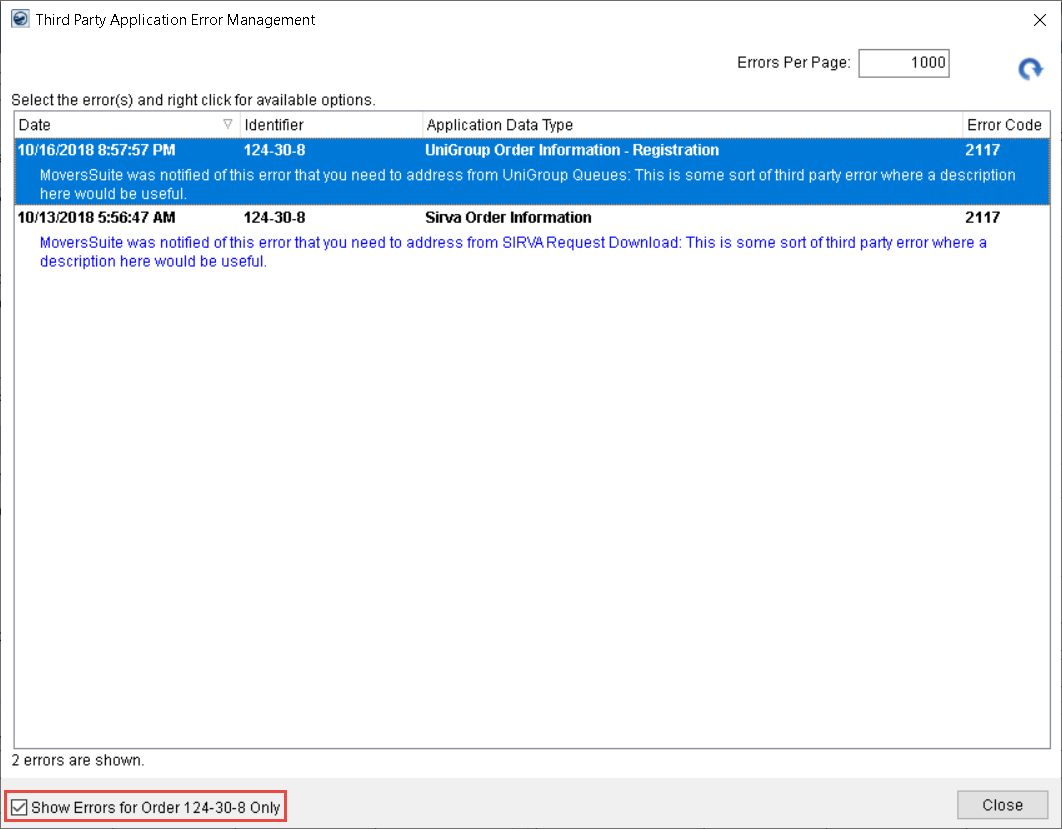
Figure 3: Third Party Application Error Management screen
In the example above, the “Show Errors for Order 124-30-8 Only” flag is checked and returned are the only two errors associated to it.
“Delete All Errors Prior To” filter added
A new right-click option named “Delete All Errors Prior To” has been added for the personnel having the “Allow Manager Privileges” flag set in their Security Profile Setup against Order Information module for any branch.
Note: This option is available even when no record is displayed or selected.
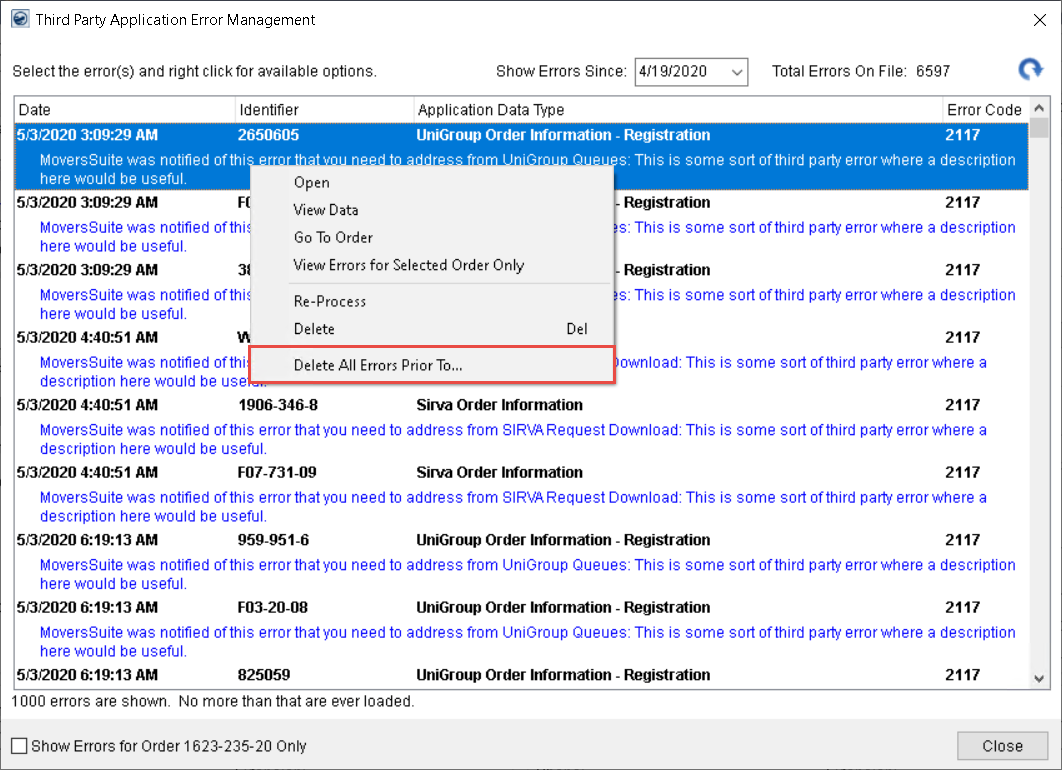
Figure 4: Third Party Application Error Management screen
Through this option, you can provide a cutoff date filter to purge all third-party errors prior to a certain date.
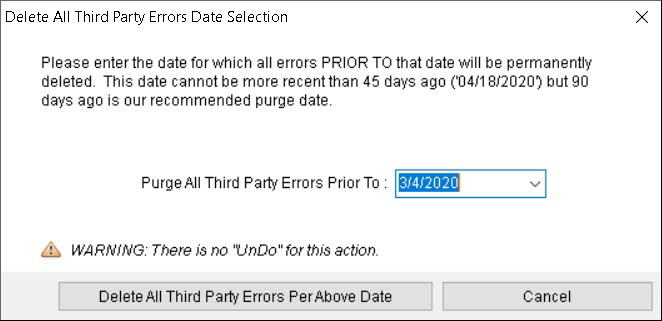
Figure 5: Delete All Third Party Errors Date Selection
If no date is provided, the application uses a default cutoff date of to purge all records older than the last 45 days.
On clicking the “Delete All Third Party Errors Per Above Date” option, a confirmation prompt pops up. If you choose Yes, you will be informed with the exact number of errors that you have deleted.
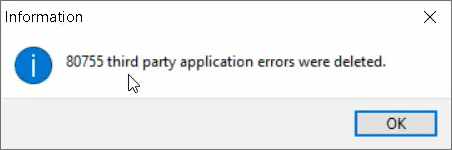
Figure 6: Information prompt on error deletion
“View Errors for Selected Orders Only” option added
A right-click option of “View Errors for Selected Orders Only” has been added to let users view all of the errors for the order of the selected error.
Note: This option is available only when one error is selected.
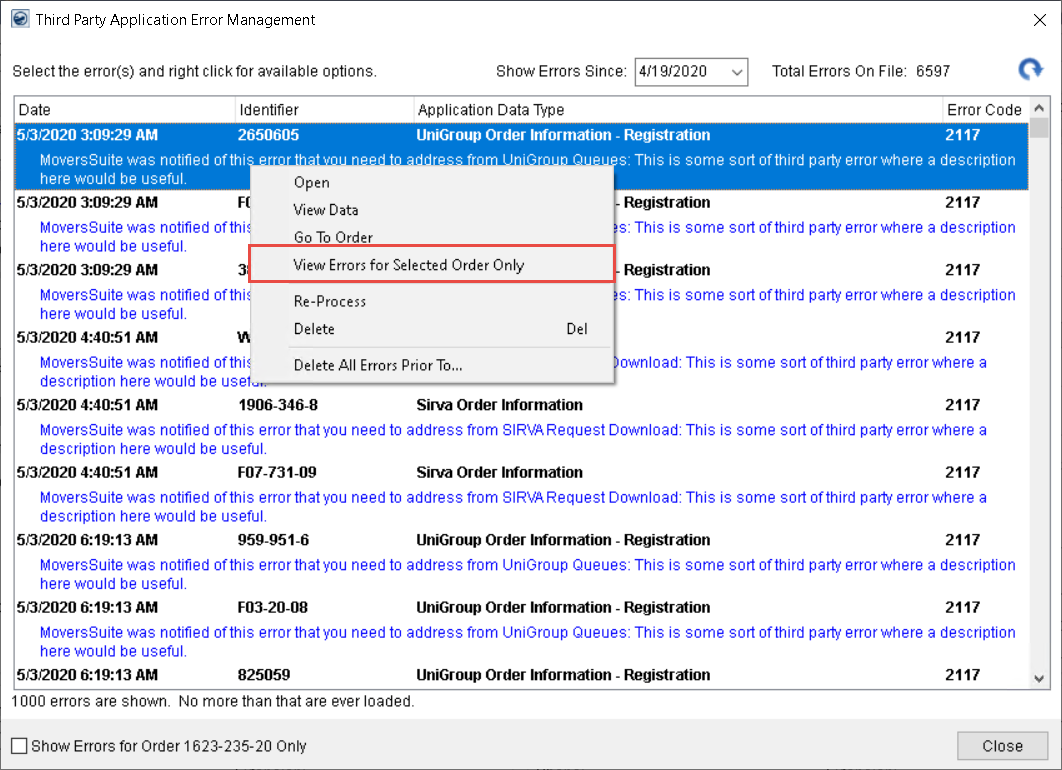
Figure 7: Third Party Application Error Management screen
Clicking this option purges all other errors and only the errors for the order of the selected error are displayed.
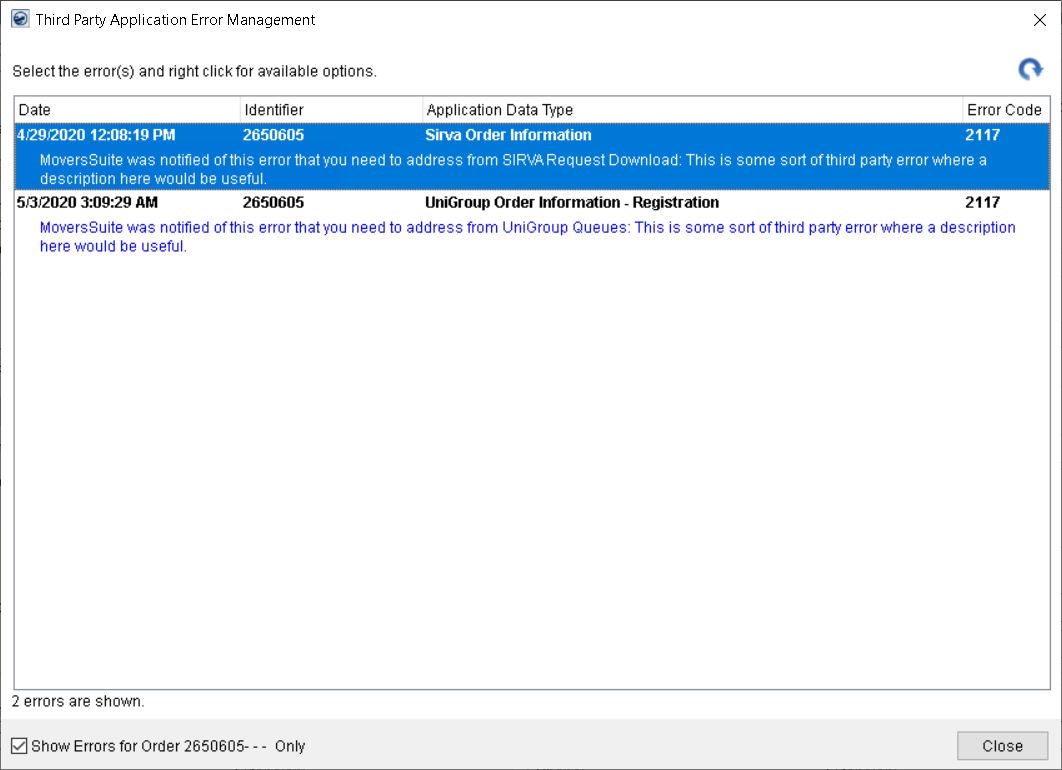
Figure 8: Third Party Application Error Management screen
Refer to the Third Party Application Error Management topic for more information.
|
SUMMARY (3055) |
|
Third Party Application Error Management screen updated. |
|
The following areas have been affected by this change: Third Party Application Error Management Schema Changes Version 2020R13
|