

Watch the Overview Video for this release
This section lists the features added to MoversSuite.
|
|
Watch the Overview Video for this release |
Account Profile Services as Bookmarks
You can now show on your custom Forms Designer documents, the services associated to the Account Profile assigned to the order. The data included in the new bookmark, is a grid displaying Service (description), Status, and Comment.
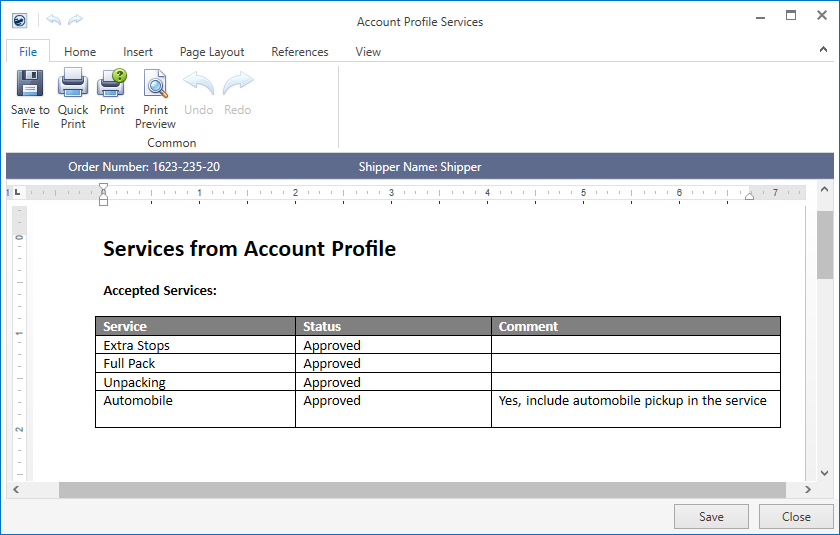
Figure 1: Sample letter with Account Profiles Services bookmark example
In the example above (Figure 1), the grid displays only the “Approved” services set within the Account Profile tab.
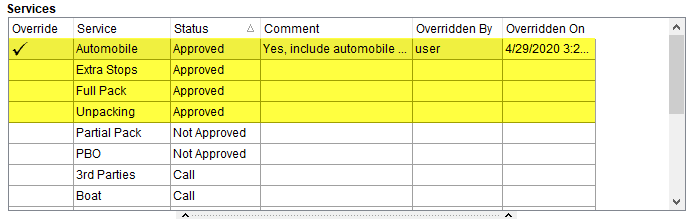
Figure 2: Services listing from Account Profile tab
You can define which services show for these new bookmarks by defining Bookmark Groups within a new setup and then assigning them to Account Profile Service Status Setup records. First, define the groups within the new Account Profile Service Bookmark Group Setup. This setup is found within the Customer Service category.
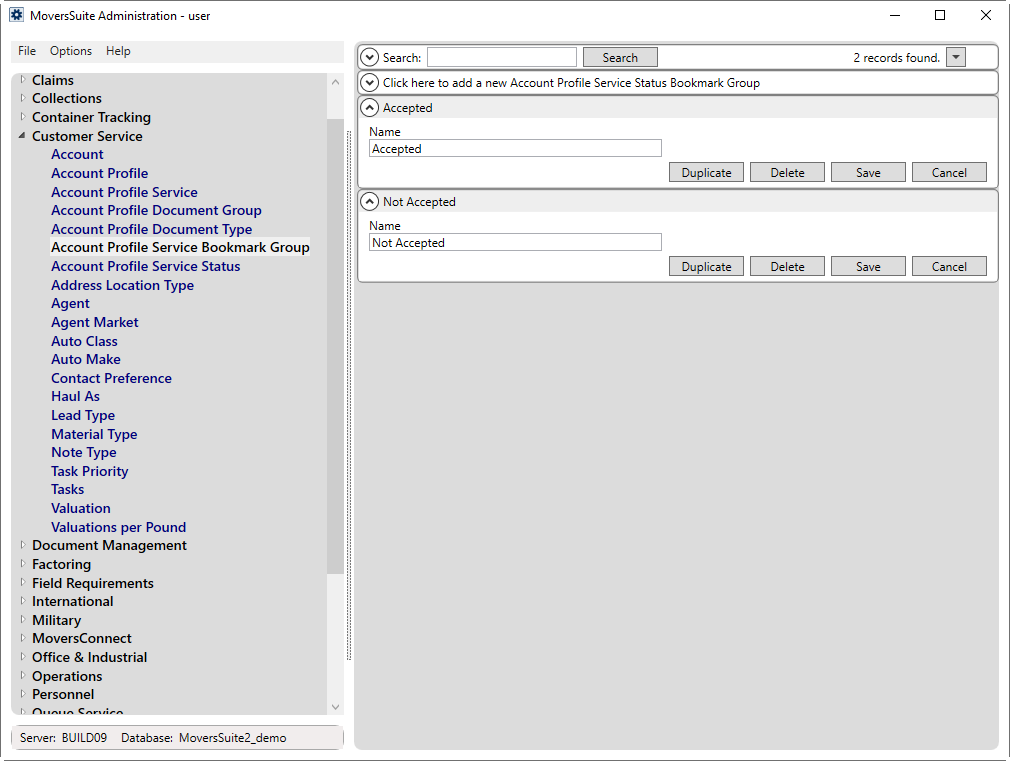
Figure 3: New Account Profile Service Status Bookmark Group setup
Next, assign the groups to Account Profile Service Status Setup records for those statuses you wish to show as bookmarks. This is done through the Bookmark Group selector.
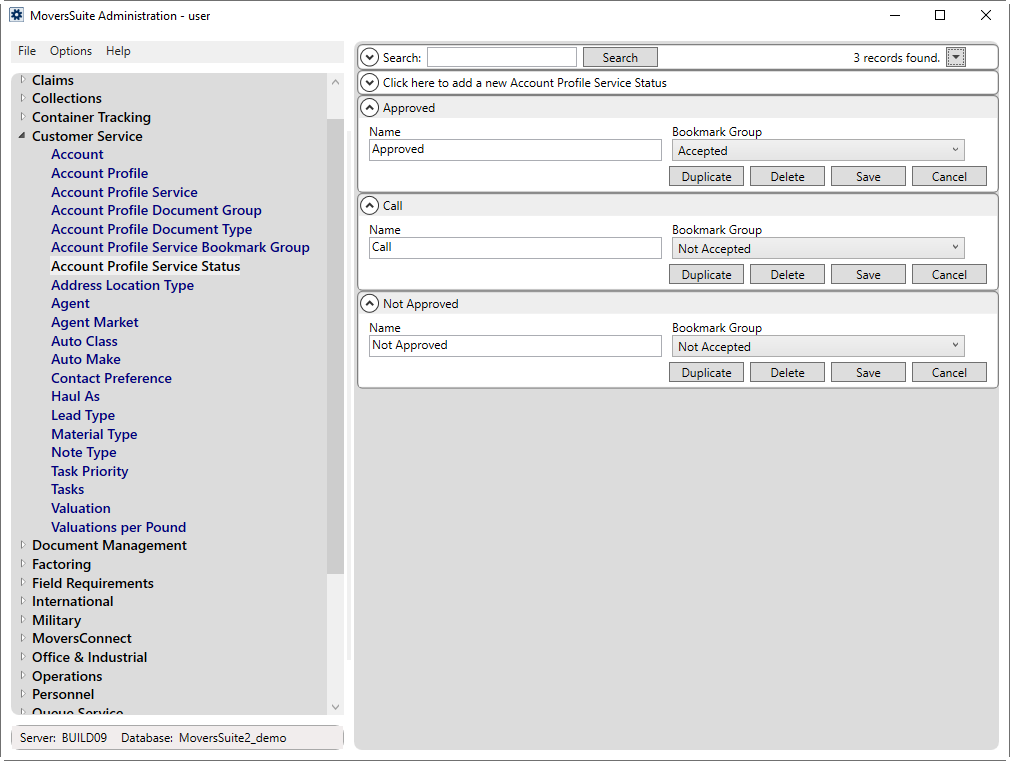
Figure 4: Updated Account Profile Service Status setup
When designing your letters and other documents, you can reference each group through a dynamically added bookmark prefaced by “Account Profile Service.” In the above example, since we assigned two groups: One titled “Accepted” and one titled “Not Accepted,” the application automatically generates two like named bookmarks. These show in the Insert Bookmark dialog under the Order Information group.
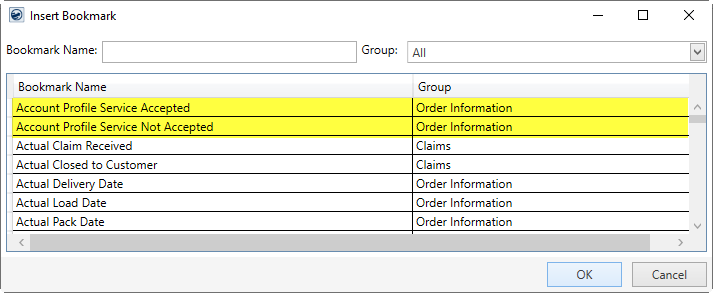
Figure 5: Insert Bookmark dialog from Forms Designer
You can create as many of the “Account Profile Service” bookmarks as needed and link them to your documents through Forms Designer.
FEATURE SUMMARY:
This new feature can be summarized as follows:
•In MoversSuite Administration, open Customer Service > Account Profile Service Bookmark Group and define groups as desired.
•Next, go into Customer Service > Account Profile Service Status and link established status values to one or more of the new Bookmark Groups.
•The Services that show for these bookmarks are those associated to the Customer Service > Account Profile within the Services tab.
•You can add these new bookmarks through the Insert Bookmark option, listed under the Order Information category. They are named in the format of Account Profile Service plus the Bookmark Group, e.g. “Account Profile Service Accepted.”
•Assign the profile and override services as needed through the Account Profile tab.
•When you generate a document that includes one of the new bookmarks, a grid displays that includes Service, Status, and Comment of the services linked to the group through the Status.
NOTES:
•You can define any number of Account Profile Service bookmarks. This number is based on the number of defined and assigned Bookmark Groups; the Bookmark Group must be assigned to at least one status to show as a Forms Designer bookmark.
•If you override a service to have a Status that is one that displays for a bookmark, then it will show up when the document generates. You can override a service through the right-click option of Service Override.
•The services display in the order in which they appear in the grid when the document generates.
BOOKMARK LABEL FORMAT:
“Account Profile Services “ + [Bookmark Group]
BOOKMARK LAYOUT:
Each service for the matching status displays within a grid containing the following data:
|
Column |
Description |
|
Service |
Displays the description of the service as defined within Account Profile Service Setup and linked to an Account Profile through the Services tab within Account Profile Setup. |
|
Status |
The current status assigned to the service displays. This is set by default through the Services tab within Account Profile Setup but can be updated through the Service Override feature. |
|
Comment |
The currently assigned comment on the service displays. This is set by default through the Services tab within Account Profile Setup but can be updated through the Service Override feature. |
Refer to Account Profile Service Status Setup, Account Profile Service Bookmark Group Setup and Order Information Bookmarks for further details.
|
SUMMARY (5644) |
|
New bookmarks available that displays Account Profile Services. |
|
The following areas have been affected by this change: Account Profile Service Status Setup Account Profile Service Bookmark Group Setup Schema Changes Version 2020R10
|