This section lists the enhancements made to MoversSuite.
Tasks: New Dependency Date Type Added
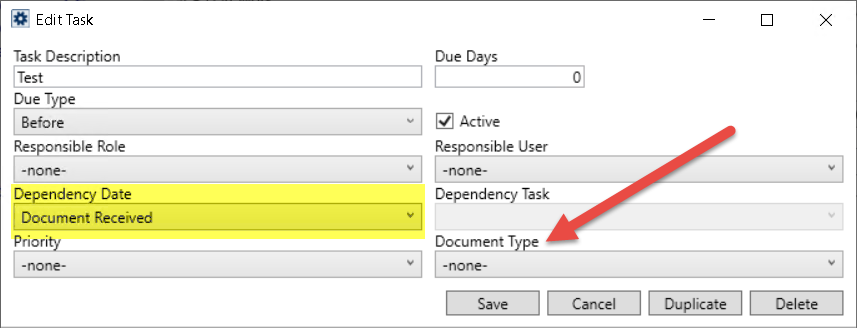
A new option of “Document Received” has been added to the list of Task Dependency Dates. Now, while adding or editing a Task through Tasks Setup, you can select a new dependency date type named as “Document Received.” Upon selecting this option, a new Document Type field is enabled to allow you to select a Document Type Setup record.
Figure 5: Edit Task
When documents are added to the Document Management system of the specified Document Type, an automatic trigger creates a new task based on the current system date. This process adds a task each time a new document is added manually or automatically to the Document Management Viewer.
NOTES:
•If the document is removed from the system, the task remains.
•The ‘Document Received’ dependency date is only valid for Order Information tasks and will not work with Claims tasks.
Refer to the Tasks, Tasks Setup and Task Dependency Dates topic for more information.
|
SUMMARY (5749) |
|
New dependency date type added in Task Dependency Dates. |
|
The following areas have been affected by this change: Task Dependency Dates Schema Changes Version 2020R06
|
Enterprise BI Views: Task Note Added to Task Information View
The Task Information view in the Enterprise BI Views has been updated to display the task Note associated to the task.
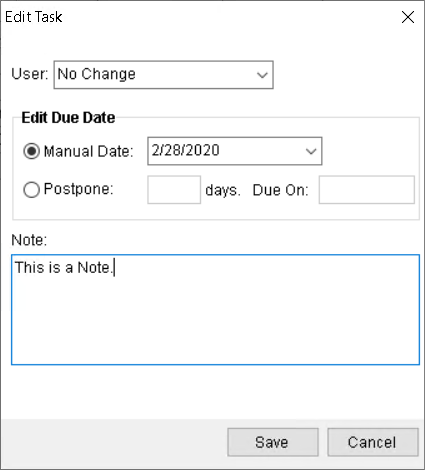
Figure 6: Edit Task
NOTE: You can add or update the Note on a task through the Edit Task dialog.
|
SUMMARY (5572) |
|
Task note added to “Task Information” view. |