This section lists the features added to MoversSuite.
UniGroup Integration:
Quote associated to UniGroup International update one at a time
The quote associated to an UniGroup International order now updates upon any upload or download.
The updates affect the single Accepted quote linked to UniGroup on the order. If changes affecting the quote are encountered, then subsequent uploads or downloads will update the quote.
The process evaluates all charges on a line-by-line basis and updates the Charge (Billed Charge) and Actual Charge from the Service Provider (vendor) as needed. The process also adds any new line items.
Quotes added before you upgrade to this release will need to be handled differently from any new quotes. Refer to the Uploading Old UniGroup Quotes topic for details on managing existing quotes.
Refer to the Quote Information section within the UniGroup International Upload and Download Content topic for a listing of data exchanged for a quote.
|
SUMMARY (5285) |
|
Accepted quotes updated individually upon an upload or download on an UniGroup International order. |
|
The following areas have been affected by this change: UniGroup International Upload and Download Content Schema Changes Version 2019R06
|
UniGroup Integration:
Minimize the chance of losing Containers and Lift Van data
To better safeguard the Container/Lift Van/Airbox Information data that you enter in MoversSuite for an UniGroup International order, MoversSuite has been updated as follows:
•Container/Lift Van/Airbox Information data in MoversSuite is no longer deleted if the UniGroup download does not include containers and/or lift vans.
•Add, Edit, and Delete functions are disabled within the Container/Lift Van/Airbox Information tab when the main order is in Edit mode.
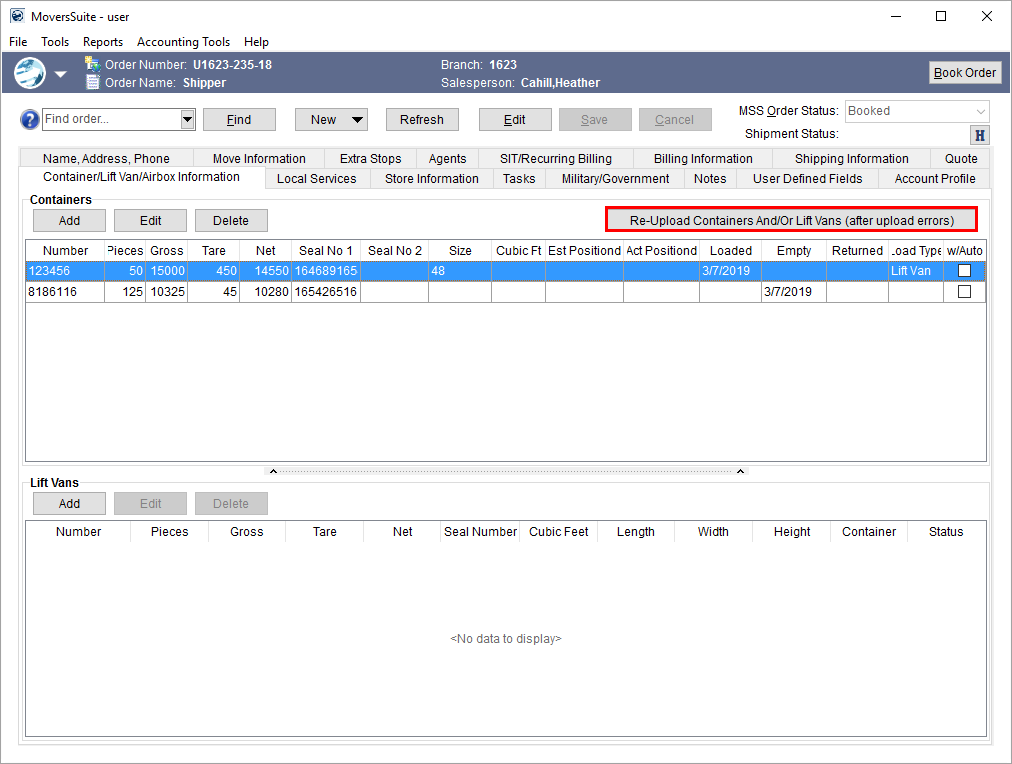
•A new Re-Upload Containers and/or Lift Vans (after upload error) button is available through the Container/Lift Van/Airbox Information tab allowing you to send updates to UniGroup in the case that a previous upload failed to send the container/lift van data. Of note, the application automatically uploads changes made to the Container/Lift Van/Airbox Information data, therefore the button functions only to re-send existing information after an error occurred.
•When any Container/Lift Van/Airbox Information record is deleted, all remaining records are automatically uploaded.
The new Re-Upload Containers and/or Lift Vans button is available for all UniGroup International orders with containers and/or lift vans.
Figure 1: Container/Lift Van/Airbox Information tab
Refer to the UniGroup International and Container/Lift Van/Airbox Information topics for more information.
|
SUMMARY (5318) |
|
Container/Lift Van/Airbox Information processing logic changed for an UniGroup International order. |
|
The following areas have been affected by this change: Container/Lift Van/Airbox Information UniGroup International Upload and Download Content
|